Cep' ten ödev yapma zamanı. Ödevimi nasıl yapacam diye dert etmek yok, bilgisayar aramak yok, şimdi cepten ders yapmak, ödev yapmak çok kolay.
Akıllı telefonlarda ödev yapmak hiç bu kadar kolay olmamıştı!
Sosyal öğrenim zirveye çıkıyor. Daha önce de duyurulduğu gibi Brainly Sosyal Öğrenim Ağları, bilgi paylaşımının daha etkili bir şekilde kullanılması için IOS ve Android uygulamalarını güncelleyerek hizmete sundu.
Brainly Sosyal Öğrenim Ağı Türkiye’de Eodev.com tarafından temsil edilmektedir. İlkokuldan üniversiteye kadar öğrencilerin bir araya geldiği bu ücretsiz portal, gamefication metodu (sosyal oyun kuramı) ile öğrencilere ev ödevlerinde birbirlerine yardımcı olabilecekleri, tartışabilecekleri, iletişim kurabilecekleri keyif ve rekabet içerisinde geçen bir ortam sunuyor. Bir yıl önce Türkiye’de hizmete girmiş olan portal mobil uygulamalarında geliştirilmesi ile kısa zaman zarfında öğrenciler, öğretmenler ve veliler tarafından kazandığı popülerlüğin yanı sıra kazanmış olduğu başarılarlada takdirler kazanmıştır.
“Mobil cihazlar için geliştirmiş olduğumuz uygulamaları güncellememiz daha önceki yapmış olduğumuz çalışmalarımızın doğal bir devamıdır. Yeni güncellemeler sayesinde sosyal öğrenimi daha ileriye taşıyacak modern, pratik ve hızlı uygulamalarımızla kullanıcılarımızın karşısına çıkmaktan dolayı heyecan içerisindeyiz. “Takım olarak çalışma, yalnız çalışmaktan daha etkili ve eğlencelidir” felsefemizi hız kesmeden yapacağımız çalışmalarımızla daha ileriye taşıyacağız.” dedi Michal Borkowski, Brainly.com SEO ve Eş Kurucusu.
Nasıl Çalışır?
Tamamen ücretsiz olan uygulamaya yüklendikten sonra klasik olarak ya da Facebook ile giriş yapılabilir. Anasayfa içerisinde bulunan arama motoru sayesinde istenilen ders konusu hakkında sorulmuş olan sorular, cevaplar ve bilgiler aranabilir. Filtre özelliği sayesinde ise okul seviyesi ve konular özel olarak seçilerek arama bu şekilde özelleştirilebilir. Ekle butonu sayesinde soru sormak ve cevaplamak çok hızlı ve basittir. Ayrıca resmini çekmiş olduğunuz bir soruyu direk olarak sorabilme avantajına da sahipsiniz. Cevapların yanı sıra yorum ekleme özelliği ile tartışarak sorular hakkında daha fazla bilgi sahibi olabilirsiniz.
Brainly.com IOS ve Android uygulamaları 2013 yılında hizmete girmiş olup şuana kadar 360 bin kez indirilmiş ve 100 bini aşkın soru ve cevap yine mobil uygulamar tarafından verilmiştir. Uygulamanın Türkçe versiyonu eğitim kategorisinde en iyi dört uygulama arasına girmiş ve aynı zamanda tavsiye edilen uygulamalar arasında yer almıştır.
Eodev.com uygulamalarını indir
Brainly.com Hakkında
Brainly.com öğrenmenize olanak sağlayan, deneyimlerinizi paylaşmanıza fırsat veren ve yeni insanlarla tanışabileceğiniz ortamı oluşturan bir sosyal öğrenim ağları grubudur. Grup aşağıdaki ülkelerde mevcuttur: Zadane.pl (Polonya), Znanija.com (Rusya, Ukrayna ve diğer Rusça konuşan ülkeler), E-aufgabe.de (Almanya), Misdeberes.es (İspanya, Meksika ve Güney Amerika), NosDevoirs.fr (Fransa), Eodev.com (Türkiye) ve Brainly.com.br (Portekiz ve Brezilya). Hep birlikte 19 ülkeyi kapsayıp,aylık 11 milyondan fazla farklı kullanıcıya hizmet veren ağlardır. Daha fazla bilgi için: http://brainly.com/.
Etiketler: cepten ödev, cepten ödev yapma, akıllı telefondan ödev yapmak programı, telefondan ödev yapma programı, cep telefonundan ödev nasıl yapılır, cepten ödev yap, cep telefonundan ödev yap, akıllı telefondan ödev yap, cep telefonuyla ev ödevi, cepten ders, cepten ders yapma, cepten ödev yapmak, iphone ile ödev yapmak, iphone ile ders yapmak, iphone ödev programı, iphone ders programı indir, ödev programı indir, iphone ödev yap, cepten ödev yapma proframı indir, cepten ders yapma programı indir, iphone ders yapma programı indir,
30 Eylül 2013 Pazartesi
29 Eylül 2013 Pazar
Mehmet Dede yaşımını yitirdi
Dünyanın en yaşlı insanları arasında yer alan 1889 doğumlu Mehmet Tatar, hayatını kaybetti. 2 çocuk ve 65 torun sahibi, 124 yaşındaki Mehmet Tatar, geçen Ramazan Bayramı'nda bir şeker firmasının reklam filminde ''aile birliği'', ''aile bağları'' ve ''bayramlar aileyle güzel geçer'' mesajıyla hafızlarda yer etmişti.
Hareket halindeki arabada ilişkiye girdiler! (18+)
Amerika Birleşik Devletleri’nin Chicago eyaletinde bulunan Eisenhower otobanında bir çift, otomobillerinde son sürat hareket halinde cinsel ilişkiye girerken kameraya takıldı. Ateşli çift, görüntülendiklerini anlamalarına rağmen istiflerini bozmadan, yoğun otobanda kendi ve diğer sürücülerin can güvenliğini tehlikeye atmaya devam ettiler. Görüntülerde, çifti geçen bir araçtan çekilen videonun sahibinin, “Benden bu kadar, kaydettim edeceğim kadar, artık bakmayacağım…” derken, yanındaki kişinin, “Kadının zıpladığını bir daha görmek istiyorum…” şeklindeki cevabı duyuluyor
28 Eylül 2013 Cumartesi
Alfabemiz değişiyor. Türk alfabesine yeni harfler geliyor
'W, X, Q' sinyali
AK Parti Genel Başkan Yardımcısı Mehmet Ali Şahin, 'w, x ve q' harflerinin kullanımına izin verilebileceği sinyalini verdi. Şahin, "Bu harfler, fiilen hayatımızda zaten kullanılıyor, yasal alt yapı oluşturmak bir ihtiyaç" dedi.
Demokratikleşme paketi Başbakan Erdoğan tarafından pazartesi günü saat 11.00'de açıklanacak.
Çözüm sürecinin en önemli ayağı olduğu belirtilen paketin içeriği ise merak konusu.
Pakette Türk Harfleri Yasası'nın değiştirilerek 'x, w, q' harflerinin kullanılmasına izin verileceği iddiaları Karabük ziyareti sırasında AK Parti Genel Başkan Yardımcısı Mehmet Ali Şahin'e soruldu.
Bu harflerin fiilen zaten kullanıldığını söyleyen Şahin, şunları kaydetti:
"Açıklanmayan bir paketle ilgili değerlendirme yapmam uygun olmaz. Şu anda internet ve bilgisayar kullananlar o harfleri zaten kullanıyor. Fiilen hayatımızda kullanılan harfler. Dolayısıyla fiili bir uygulama var.
Fiili uygulamanın yasal alt yapısını tamamlayarak gerçeğe dönüştürmek herhalde Türkiye'nin bir ihtiyacıdır diye değerlendiriyorum. Bunu mutlaka farklı bir etnik yapının alfabesiyle dili ile ilişkilendirerek yorum yaparsanız konu farklı yönlere çıkar.
Türkiye'nin buna ihtiyacı var. Bilim ve teknoloji geliştikçe, bizim alfabemizde olmayan bazı harfleri kullanır hale gelmişiz. Bunun önünü açıyoruz. Ana dilde eğitimle ilgili Türkiye'de bir sorun kalmadı. 20 veli talepte bulunduğunda okullarda Kürtçe'nin öğretilmesi söz konusu. Bu dil öğretilirken alfabemizdeki harf sayısı buna yeterli değilse, bu konuda adım atmamız gerekebilir. Bu işin tabiatı gereğidir."
1928′DE YASA DEĞİŞİYOR
Arka arkaya alınan kararlar ile sorun belli bir yere kadar aşıldı. Kürtçe seçmeli dersin yanında Kürtçe özel eğitime izin verilmesi ile birlikte üç harfle ilgili yine sorun yaşanacak. Çünkü 1928 yılında çıkartılan ve devrim kanunları arasında yer alan Türk Harflerinin Kabul ve TatbikiHakkında Kanun, Türkçe alfabeyi 29 harfle sınırlıyor ve bunların dışında harf kullanılmasınakapıları kapatıyor.
ÜÇ HARF RAHATÇA KULLANILACAK
Yasanın maddelerinden biri de “Bütün mekteplerin Türkçe yapılan tedrisatında Türk harflerikullanılır” hükmünü içeriyor. Paket kapsamında bu yasada değişikliğe gidilmesi planlanıyor. Yapılacak düzenleme ile Türkçe Alfabe 29 harf olarak kalacak. Bunun yanında x, w, q’nunkullanılmasına ilişkin engeller de kaldırılacak. Üç harf hayatın her alanında rahatçakullanılabilecek. Bu değişiklik özellikle Kürtçe özel eğitimde sıkıntı yaşanmaması için yapılacak.Vatandaşlar, Kürtçe isimleri, köy adlarını da herhangi bir engelleme olmadan kullanma olanağı bulunacak.
AZINLIK OKULUNDA ’AND’ YOK
“Türküm, doğruyum” diye başlayan ve okullarda okutulan “Andımız” da pakette kapsamında değiştirilecek. Gayrimüslim vatandaşların devam ettiği azınlık okullarında okutulmayacak. Diğer eğitim kurumlarında ise şimdilik uygulama devam edecek. Bir şekilde yurtdışınayaşayan Türkiye kökenli gayrimüslimlere vatandaşlık verilmesi de paket kapsamındadeğerlendiriyor.
Türk Alfabesi'ne Yeni Harfler! BDP Teklif Verdi Top Mecliste!
Barış ve Demokrasi Partisi (BDP) Hakkâri Milletvekili Adil Kurt; ê, î, x,w,q harflerinin alfabede kullanılması için kanun teklifi verdi. Adil Kurt, 1353 Sayılı Türk Harflerinin Kabul ve Tatbiki Hakkında Kanunda Değişiklik Yapılmasına Dair Kanun Teklifi'ni Meclis Başkanlığı'na sundu.
Teklifin gerekçesinde, Türkçede bulunmayan ê, î, x,w,q harfleri nedeniyle Kürtçe isimlerin fiilen engellendiği belirtildi. "Doğu ve Güneydoğu bölgelerindeki birçok belediyenin anadilde hizmet sunma, Kürtçe basılmış broşür, afiş, davetiye kartlarından dolayı yerel yöneticiler hakkında sayısız davalar bulunmaktadır.
Başta parklar olmak üzere birçok yere verilen Kürtçe isimlere mülki amirleri ve savcılar tarafından, TCK'nın 222. maddesi kapsamında Harf Kanunu'na muhalefetten çok sayıda dava açılmış, parklara ve kültür merkezlerine verilen isimler iptal edilmiştir." denildi.
Teklifle; ê, î, x,w,q harflerinin verilecek tapu kayıtları ve senetleri, nüfus ve evlenme cüzdanları ve kayıtları, askeri hüviyet ve terhis cüzdanı gibi özel isimlerin kullanımının söz konusu olduğu durumlarda ilgili kayıtlarda yer alabilmesi öngörülüyor.
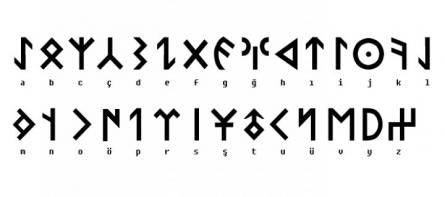
Köktürk, göktürk, orhun alfabesi türklerin en eski alfabesi
Osmanlıca alfabe
Karnında birahane taşıyor
ABD'de bir damla alkol almadan sarhoş olan adamın midesinin, bir maya türü sayesinde kendi kendine etanol ürettiği ortaya çıktı.
Amerikalı doktorlar bir damla bile alkol içmeden sarhoş olan bir adam buldu. 61 yaşındaki Teksaslı adamın midesi kendi kendine etanol üretiyordu. Kanında 0.37 alkol çıkan adamın, alkol tüketmediği iddiası dikkate alındığında daha da şaşırtıcı olan baş dönmesi ve buna bağlı tökezleme görülmesiydi.
DOKTORLAR ŞAŞKIN
Hastanenin gastroenterologu ve başhemşiresi bu konuyu araştırmaya karar verip, adamı karbonhidrat açısından zengin ve alkolden kesinlikle yoksun bir diyetle 24 saat boyunca bir odada tuttu. Gün boyunca karbonhidrattan zengin beslendi, alkole ulaşma imkânı da yoktu ama adamın etanol içeriği ikinci gün sonunda yüzde 0.12 artmaya devam etti. Adamın "otomatik birahane sendromuna" yakalandığı tespit edildi. Yedikleri midesine yerleşen ve tomurcuklanan bir maya türü sayesinde alkol etkisi yapıyordu. Hastanın makarna, ekmek yediğinde veya bir soda içtiğinde şekerin etanola dönüştüğünü açıklayan doktorlar, yeme alışkanlıklarını değiştirmek zorunda kaldı. Sadece et ve balık, kümes hayvanları yiyebilir ve ama tavuk, patates, domates ve soya yasak. Meyve (narenciye hariç) ve fındık (fıstık hariç), şeker ilavesiz meyve suları, bitkisel çaya izin veriliyor.
milliyet
Korkunç cinayette sır perdesi çözüldü!
Samsun'un Bafra ilçesinde akrabası olan kadını 45 bıçak darbesiyle öldüren, 1 yaşındaki çocuğunu da darp ederek ölümüne yol açan katil zanlısı sevk edildiği mahkemece tutuklandı. Emniyetteki ifadesinde her şeyi itiraf eden katil zanlısı, kadını kendisine 'topal' dediği için öldürdüğünü ileri sürdü.
Korkunç cinayetin ardından çalışma başlatan Samsun Cinayet Bürosu ekipleri ve Bafra Emniyet Müdürlüğü Asayiş Büro ekipleri parmak izinden yola çıkarak kısa sürede zanlıya ulaştı. Cinayetin işlendiği gece, şüphe üzerine gözaltına alınan Okan Ç. (28), önce serbest bırakıldı. Daha sonra öldürdüğü akrabasının cenazesine giden Okan Ç., polis tarafından tekrar gözaltına alındı. Zanlı, emniyetteki sorguda her şeyi anlatarak cinayeti işlediğini kabul etti. Çaldığı 3 bileziğin 2'sini bozdurduğunu, diğerini eşine verdiğini itiraf eden katil zanlısı Okan Ç., bozdurduğu iki bileziğin parası 2 bin lirayı sakladığı yeri ve olayda kullandığı bıçağı attığı yeri söylemesi üzerine buralarda arama yapan emniyet ekipleri, parayı ve olayda kullandığı bıçağı buldu.
ÇOCUK DA ÖLDÜ
Zanlı Okan Ç., 1 yaşındaki küçük kız Zeynep Gül'ün ağlayarak annesinin peşinden geldiğini, onu da tutup yere fırlattığını itiraf etti. Olayda katil zanlısının darp ettiği Aysel Erol'un 1 yaşındaki kızı Zeynep Gül de Samsun Ondokuz Mayıs Üniversitesi (OMÜ) Tıp Fakültesi'nde hayatını kaybetti.
Bafra Emniyet Müdürlüğü ekipleri ve Samsun'dan gelen çevik kuvvet polislerinin geniş önlemi altında gece geç saatlerde Bafra Adliyesi'ne getirilen katil zanlısı, savcılıktaki ifadesinin ardından gece 02.30'da tutuklanma talebiyle sevk edildiği nöbetçi mahkemece tutuklanarak geniş güvenlik önlemleri altında Bafra T Tipi Kapalı Cezaevi'ne gönderildi.
kaynak haberturk
25 Eylül 2013 Çarşamba
Page peel effect using jQuery
Page Peel is a popular page flip effect that when your cursor is passing over it, will show "what's behind" as if it would be a book. There are many ways to do this, many of them use flash files which makes it less customizable, however, the one that we will see in this post is made with jQuery.
Usually, the content that is "behind", is an image for subscribing to feed, but you can put any image and link to any page.
Demo
You can see an example in this demo blog.
1. Log in to your Blogger dashsboard, select your blog > then go to Template > Edit HTML
2. Click anywhere inside the code area and search for the below tag by pressing the CTRL + F keys:
- You need to replace the url in red with the address of your blog, that will be the link to the blog's feed when the user clicks on the image behind, but you can put any URL in case you want to link to another page.
6. And that's it. To save the changes, click the Save template button.
Remember that this Page Peel effect uses jQuery, so you should only have one version of it, and if you use Scriptaculous or Mootools, you should apply some changes.
Usually, the content that is "behind", is an image for subscribing to feed, but you can put any image and link to any page.
Demo
You can see an example in this demo blog.
How to Add the Page Curl Effect on Blogger
1. Log in to your Blogger dashsboard, select your blog > then go to Template > Edit HTML
2. Click anywhere inside the code area and search for the below tag by pressing the CTRL + F keys:
</head>3. Just before </head> copy and paste this script:
<script src='http://ajax.googleapis.com/ajax/libs/jquery/1.10.2/jquery.min.js' type='text/javascript'/>4. Then before ]]></b:skin> (CTRL + F to find it - if necessary, click on the left arrow) paste these styles:
<script>
//<![CDATA[
$(document).ready(function(){
$("#pageflip").hover(function() {
$("#pageflip img , .msg_block").stop()
.animate({
width: '307px',
height: '319px'
}, 500);
} , function() {
$("#pageflip img").stop()
.animate({
width: '50px',
height: '52px'
}, 220);
$(".msg_block").stop()
.animate({
width: '50px',
height: '50px'
}, 200);
});
});
//]]>
</script>
/* Page Flip5. Finally, paste after <body> tag or if you can't find it, after this code:
----------------------------------------------- */
#pageflip {
position: relative;
right: 0;
top: 0px; /* Change to 30px if you have the navbar (navigation bar) */
float: right;
z-index:9;
}
#pageflip img {
width: 50px;
height: 52px;
z-index: 99;
position: absolute;
right: 0;
top: 0;
-ms-interpolation-mode: bicubic;
}
#pageflip .msg_block {
width: 50px;
height: 50px;
overflow: hidden;
position: absolute;
right: 0;
top: 0;
background: url(http://oi44.tinypic.com/2hheno6.jpg) no-repeat right top;
}
#pageflipMirror {
position: static;
right: 0;
top: 0;
float: right;
}
<body expr:class='"loading" + data:blog.mobileClass'>The following code:
<div id='pageflip'>- In blue you will see a URL - this is the URL of the image that, in this case, is an invitation to subscribe to the feed. You can change it later to another (should be of the same size).
<a href='http://name-of_your_blog.blogspot.com/atom.xml'>
<img src='http://oi40.tinypic.com/10fqnav.jpg' style='width: 50px; height: 52px; overflow-x: hidden; overflow-y: hidden;'/></a>
<div class='msg_block' style='width: 50px; height: 50px; overflow-x: hidden; overflow-y: hidden; '/>
</div>
- You need to replace the url in red with the address of your blog, that will be the link to the blog's feed when the user clicks on the image behind, but you can put any URL in case you want to link to another page.
6. And that's it. To save the changes, click the Save template button.
Remember that this Page Peel effect uses jQuery, so you should only have one version of it, and if you use Scriptaculous or Mootools, you should apply some changes.
Customize the scroll bar (scrollbar) with JScrollPane
JScrollPane is a jQuery script that allows you to change the blog' scroll bar, ie the browser scrollbar.
Although we can use CSS to change it, the problem is that is not standardized, because with CSS we can make it work only in Chrome and Safari; and in the case of Internet Explorer it also has its own code but obviously it only works in that browser (I don't know which versions). So what we will do then is to give a new look to the scrollbar but by using jQuery, so the change will be visible in all browsers.
Demo
You can see an example in this test blog where the scroll bar has a different shape and color.
1. Go to Template > Edit HTML and before </head> paste this code:
2. Then locate this tag:
If you want the top and bottom limits to not appear (as in the example) then remove what is in red.
Remember that the script uses jQuery, so if you already have it, then don't put the script again (the first line of code). If you are using Scriptaculous or Mootools, then you should make some slight changes in order to make it work.
Maybe the code might appear long but better add the scripts directly in the template, so the scripts will always be available and load faster. Regardless of all of this the end result is quite aesthetic, don't you think?
Although we can use CSS to change it, the problem is that is not standardized, because with CSS we can make it work only in Chrome and Safari; and in the case of Internet Explorer it also has its own code but obviously it only works in that browser (I don't know which versions). So what we will do then is to give a new look to the scrollbar but by using jQuery, so the change will be visible in all browsers.
Demo
You can see an example in this test blog where the scroll bar has a different shape and color.
How to change the scrollbar on Blogger
1. Go to Template > Edit HTML and before </head> paste this code:
<script src='//ajax.googleapis.com/ajax/libs/jquery/1.10.2/jquery.min.js' type='text/javascript'/>
<style>
.jspContainer {overflow: hidden;position: relative;}.jspPane {position: absolute;}
.jspVerticalBar {position: absolute;top: 0;right: 0;width: 16px;height: 100%;background: #ccc;}
.jspHorizontalBar {position: absolute;bottom: 0;left: 0;width: 100%;height: 16px;background: #ccc;}
.jspVerticalBar *,.jspHorizontalBar * {margin: 0;padding: 0;}
.jspCap {display: none;}.jspHorizontalBar .jspCap {float: left;}
.jspTrack {
background: #fff; /* background color of the bar */
position: relative;
}
.jspDrag {
background: #CC0000; /* Color of the scrollbar */
position: relative;
top: 0;
left: 0;
cursor: pointer;
}
.jspHorizontalBar .jspTrack,
.jspHorizontalBar .jspDrag {
float: left;
height: 100%;
}
.jspArrow {
background: #888; /* The color of the scrollbar limits */
text-indent: -20000px;
display: block;
cursor: pointer;
}
.jspArrow.jspDisabled {
cursor: default;
background: #333; /* Color of the limits when the srollbar is reaching them */
}
.jspVerticalBar .jspArrow {
height: 16px;
}
.jspHorizontalBar .jspArrow {
width: 16px;
float: left;
height: 100%;
}
.jspVerticalBar .jspArrow:focus {outline: none;}.jspCorner {background: #eeeef4;float: left;height: 100%;}* html .jspCorner {margin: 0 -3px 0 0;}
html, body {
height: 100%;
margin: 0;
padding: 0;
}
#blog-container {
height: 100%;
margin: 0;
padding: 0;
overflow: auto;
}
</style>
<script>
//<![CDATA[
/*! Copyright (c) 2013 Brandon Aaron (http://brandonaaron.net)
* Licensed under the MIT License (LICENSE.txt).
* Version: 3.1.3
*/
(function (factory) {
if ( typeof define === 'function' && define.amd ) {
define(['jquery'], factory);
} else if (typeof exports === 'object') {
module.exports = factory;
} else {
// Browser globals
factory(jQuery);
}
}(function ($) {
var toFix = ['wheel', 'mousewheel', 'DOMMouseScroll', 'MozMousePixelScroll'];
var toBind = 'onwheel' in document || document.documentMode >= 9 ? ['wheel'] : ['mousewheel', 'DomMouseScroll', 'MozMousePixelScroll'];
var lowestDelta, lowestDeltaXY;
if ( $.event.fixHooks ) {
for ( var i = toFix.length; i; ) {
$.event.fixHooks[ toFix[--i] ] = $.event.mouseHooks;
}
}
$.event.special.mousewheel = {
setup: function() {
if ( this.addEventListener ) {
for ( var i = toBind.length; i; ) {
this.addEventListener( toBind[--i], handler, false );
}
} else {
this.onmousewheel = handler;
}
},
teardown: function() {
if ( this.removeEventListener ) {
for ( var i = toBind.length; i; ) {
this.removeEventListener( toBind[--i], handler, false );
}
} else {
this.onmousewheel = null;
}
}
};
$.fn.extend({
mousewheel: function(fn) {
return fn ? this.bind("mousewheel", fn) : this.trigger("mousewheel");
},
unmousewheel: function(fn) {
return this.unbind("mousewheel", fn);
}
});
function handler(event) {
var orgEvent = event || window.event,
args = [].slice.call(arguments, 1),
delta = 0,
deltaX = 0,
deltaY = 0,
absDelta = 0,
absDeltaXY = 0,
fn;
event = $.event.fix(orgEvent);
event.type = "mousewheel";
if ( orgEvent.wheelDelta ) { delta = orgEvent.wheelDelta; }
if ( orgEvent.detail ) { delta = orgEvent.detail * -1; }
if ( orgEvent.deltaY ) {
deltaY = orgEvent.deltaY * -1;
delta = deltaY;
}
if ( orgEvent.deltaX ) {
deltaX = orgEvent.deltaX;
delta = deltaX * -1;
}
if ( orgEvent.wheelDeltaY !== undefined ) { deltaY = orgEvent.wheelDeltaY; }
if ( orgEvent.wheelDeltaX !== undefined ) { deltaX = orgEvent.wheelDeltaX * -1; }
absDelta = Math.abs(delta);
if ( !lowestDelta || absDelta < lowestDelta ) { lowestDelta = absDelta; }
absDeltaXY = Math.max(Math.abs(deltaY), Math.abs(deltaX));
if ( !lowestDeltaXY || absDeltaXY < lowestDeltaXY ) { lowestDeltaXY = absDeltaXY; }
fn = delta > 0 ? 'floor' : 'ceil';
delta = Math[fn](delta / lowestDelta);
deltaX = Math[fn](deltaX / lowestDeltaXY);
deltaY = Math[fn](deltaY / lowestDeltaXY);
args.unshift(event, delta, deltaX, deltaY);
return ($.event.dispatch || $.event.handle).apply(this, args);
}
}));
/*
* jScrollPane - v2.0.0beta5 - 2010-09-18
* http://jscrollpane.kelvinluck.com/
* Copyright (c) 2010 Kelvin Luck
* Dual licensed under the MIT and GPL licenses.
*/
(function(b,a,c){b.fn.jScrollPane=function(f){function d(C,L){var au,N=this,V,ah,v,aj,Q,W,y,q,av,aB,ap,i,H,h,j,X,R,al,U,t,A,am,ac,ak,F,l,ao,at,x,aq,aE,g,aA,ag=true,M=true,aD=false,k=false,Z=b.fn.mwheelIntent?"mwheelIntent.jsp":"mousewheel.jsp";aE=C.css("paddingTop")+" "+C.css("paddingRight")+" "+C.css("paddingBottom")+" "+C.css("paddingLeft");g=(parseInt(C.css("paddingLeft"))||0)+(parseInt(C.css("paddingRight"))||0);an(L);function an(aH){var aL,aK,aJ,aG,aF,aI;au=aH;if(V==c){C.css({overflow:"hidden",padding:0});ah=C.innerWidth()+g;v=C.innerHeight();C.width(ah);V=b('<div class="jspPane" />').wrap(b('<div class="jspContainer" />').css({width:ah+"px",height:v+"px"}));C.wrapInner(V.parent());aj=C.find(">.jspContainer");V=aj.find(">.jspPane");V.css("padding",aE)}else{C.css("width",null);aI=C.outerWidth()+g!=ah||C.outerHeight()!=v;if(aI){ah=C.innerWidth()+g;v=C.innerHeight();aj.css({width:ah+"px",height:v+"px"})}aA=V.innerWidth();if(!aI&&V.outerWidth()==Q&&V.outerHeight()==W){if(aB||av){V.css("width",aA+"px");C.css("width",(aA+g)+"px")}return}V.css("width",null);C.css("width",(ah)+"px");aj.find(">.jspVerticalBar,>.jspHorizontalBar").remove().end()}aL=V.clone().css("position","absolute");aK=b('<div style="width:1px; position: relative;" />').append(aL);b("body").append(aK);Q=Math.max(V.outerWidth(),aL.outerWidth());aK.remove();W=V.outerHeight();y=Q/ah;q=W/v;av=q>1;aB=y>1;if(!(aB||av)){C.removeClass("jspScrollable");V.css({top:0,width:aj.width()-g});n();D();O();w();af()}else{C.addClass("jspScrollable");aJ=au.maintainPosition&&(H||X);if(aJ){aG=ay();aF=aw()}aC();z();E();if(aJ){K(aG);J(aF)}I();ad();if(au.enableKeyboardNavigation){P()}if(au.clickOnTrack){p()}B();if(au.hijackInternalLinks){m()}}if(au.autoReinitialise&&!aq){aq=setInterval(function(){an(au)},au.autoReinitialiseDelay)}else{if(!au.autoReinitialise&&aq){clearInterval(aq)}}C.trigger("jsp-initialised",[aB||av])}function aC(){if(av){aj.append(b('<div class="jspVerticalBar" />').append(b('<div class="jspCap jspCapTop" />'),b('<div class="jspTrack" />').append(b('<div class="jspDrag" />').append(b('<div class="jspDragTop" />'),b('<div class="jspDragBottom" />'))),b('<div class="jspCap jspCapBottom" />')));R=aj.find(">.jspVerticalBar");al=R.find(">.jspTrack");ap=al.find(">.jspDrag");if(au.showArrows){am=b('<a class="jspArrow jspArrowUp" />').bind("mousedown.jsp",az(0,-1)).bind("click.jsp",ax);ac=b('<a class="jspArrow jspArrowDown" />').bind("mousedown.jsp",az(0,1)).bind("click.jsp",ax);if(au.arrowScrollOnHover){am.bind("mouseover.jsp",az(0,-1,am));ac.bind("mouseover.jsp",az(0,1,ac))}ai(al,au.verticalArrowPositions,am,ac)}t=v;aj.find(">.jspVerticalBar>.jspCap:visible,>.jspVerticalBar>.jspArrow").each(function(){t-=b(this).outerHeight()});ap.hover(function(){ap.addClass("jspHover")},function(){ap.removeClass("jspHover")}).bind("mousedown.jsp",function(aF){b("html").bind("dragstart.jsp selectstart.jsp",function(){return false});ap.addClass("jspActive");var s=aF.pageY-ap.position().top;b("html").bind("mousemove.jsp",function(aG){S(aG.pageY-s,false)}).bind("mouseup.jsp mouseleave.jsp",ar);return false});o()}}function o(){al.height(t+"px");H=0;U=au.verticalGutter+al.outerWidth();V.width(ah-U-g);if(R.position().left==0){V.css("margin-left",U+"px")}}function z(){if(aB){aj.append(b('<div class="jspHorizontalBar" />').append(b('<div class="jspCap jspCapLeft" />'),b('<div class="jspTrack" />').append(b('<div class="jspDrag" />').append(b('<div class="jspDragLeft" />'),b('<div class="jspDragRight" />'))),b('<div class="jspCap jspCapRight" />')));ak=aj.find(">.jspHorizontalBar");F=ak.find(">.jspTrack");h=F.find(">.jspDrag");if(au.showArrows){at=b('<a class="jspArrow jspArrowLeft" />').bind("mousedown.jsp",az(-1,0)).bind("click.jsp",ax);x=b('<a class="jspArrow jspArrowRight" />').bind("mousedown.jsp",az(1,0)).bind("click.jsp",ax);
if(au.arrowScrollOnHover){at.bind("mouseover.jsp",az(-1,0,at));x.bind("mouseover.jsp",az(1,0,x))}ai(F,au.horizontalArrowPositions,at,x)}h.hover(function(){h.addClass("jspHover")},function(){h.removeClass("jspHover")}).bind("mousedown.jsp",function(aF){b("html").bind("dragstart.jsp selectstart.jsp",function(){return false});h.addClass("jspActive");var s=aF.pageX-h.position().left;b("html").bind("mousemove.jsp",function(aG){T(aG.pageX-s,false)}).bind("mouseup.jsp mouseleave.jsp",ar);return false});l=aj.innerWidth();ae()}else{}}function ae(){aj.find(">.jspHorizontalBar>.jspCap:visible,>.jspHorizontalBar>.jspArrow").each(function(){l-=b(this).outerWidth()});F.width(l+"px");X=0}function E(){if(aB&&av){var aF=F.outerHeight(),s=al.outerWidth();t-=aF;b(ak).find(">.jspCap:visible,>.jspArrow").each(function(){l+=b(this).outerWidth()});l-=s;v-=s;ah-=aF;F.parent().append(b('<div class="jspCorner" />').css("width",aF+"px"));o();ae()}if(aB){V.width((aj.outerWidth()-g)+"px")}W=V.outerHeight();q=W/v;if(aB){ao=1/y*l;if(ao>au.horizontalDragMaxWidth){ao=au.horizontalDragMaxWidth}else{if(ao<au.horizontalDragMinWidth){ao=au.horizontalDragMinWidth}}h.width(ao+"px");j=l-ao;ab(X)}if(av){A=1/q*t;if(A>au.verticalDragMaxHeight){A=au.verticalDragMaxHeight}else{if(A<au.verticalDragMinHeight){A=au.verticalDragMinHeight}}ap.height(A+"px");i=t-A;aa(H)}}function ai(aG,aI,aF,s){var aK="before",aH="after",aJ;if(aI=="os"){aI=/Mac/.test(navigator.platform)?"after":"split"}if(aI==aK){aH=aI}else{if(aI==aH){aK=aI;aJ=aF;aF=s;s=aJ}}aG[aK](aF)[aH](s)}function az(aF,s,aG){return function(){G(aF,s,this,aG);this.blur();return false}}function G(aH,aF,aK,aJ){aK=b(aK).addClass("jspActive");var aI,s=function(){if(aH!=0){T(X+aH*au.arrowButtonSpeed,false)}if(aF!=0){S(H+aF*au.arrowButtonSpeed,false)}},aG=setInterval(s,au.arrowRepeatFreq);s();aI=aJ==c?"mouseup.jsp":"mouseout.jsp";aJ=aJ||b("html");aJ.bind(aI,function(){aK.removeClass("jspActive");clearInterval(aG);aJ.unbind(aI)})}function p(){w();if(av){al.bind("mousedown.jsp",function(aH){if(aH.originalTarget==c||aH.originalTarget==aH.currentTarget){var aG=b(this),s=setInterval(function(){var aI=aG.offset(),aJ=aH.pageY-aI.top;if(H+A<aJ){S(H+au.trackClickSpeed)}else{if(aJ<H){S(H-au.trackClickSpeed)}else{aF()}}},au.trackClickRepeatFreq),aF=function(){s&&clearInterval(s);s=null;b(document).unbind("mouseup.jsp",aF)};b(document).bind("mouseup.jsp",aF);return false}})}if(aB){F.bind("mousedown.jsp",function(aH){if(aH.originalTarget==c||aH.originalTarget==aH.currentTarget){var aG=b(this),s=setInterval(function(){var aI=aG.offset(),aJ=aH.pageX-aI.left;if(X+ao<aJ){T(X+au.trackClickSpeed)}else{if(aJ<X){T(X-au.trackClickSpeed)}else{aF()}}},au.trackClickRepeatFreq),aF=function(){s&&clearInterval(s);s=null;b(document).unbind("mouseup.jsp",aF)};b(document).bind("mouseup.jsp",aF);return false}})}}function w(){F&&F.unbind("mousedown.jsp");al&&al.unbind("mousedown.jsp")}function ar(){b("html").unbind("dragstart.jsp selectstart.jsp mousemove.jsp mouseup.jsp mouseleave.jsp");ap&&ap.removeClass("jspActive");h&&h.removeClass("jspActive")}function S(s,aF){if(!av){return}if(s<0){s=0}else{if(s>i){s=i}}if(aF==c){aF=au.animateScroll}if(aF){N.animate(ap,"top",s,aa)}else{ap.css("top",s);aa(s)}}function aa(aF){if(aF==c){aF=ap.position().top}aj.scrollTop(0);H=aF;var aI=H==0,aG=H==i,aH=aF/i,s=-aH*(W-v);if(ag!=aI||aD!=aG){ag=aI;aD=aG;C.trigger("jsp-arrow-change",[ag,aD,M,k])}u(aI,aG);V.css("top",s);C.trigger("jsp-scroll-y",[-s,aI,aG])}function T(aF,s){if(!aB){return}if(aF<0){aF=0}else{if(aF>j){aF=j}}if(s==c){s=au.animateScroll}if(s){N.animate(h,"left",aF,ab)}else{h.css("left",aF);ab(aF)}}function ab(aF){if(aF==c){aF=h.position().left}aj.scrollTop(0);X=aF;var aI=X==0,aH=X==j,aG=aF/j,s=-aG*(Q-ah);if(M!=aI||k!=aH){M=aI;k=aH;C.trigger("jsp-arrow-change",[ag,aD,M,k])}r(aI,aH);V.css("left",s);C.trigger("jsp-scroll-x",[-s,aI,aH])}function u(aF,s){if(au.showArrows){am[aF?"addClass":"removeClass"]("jspDisabled");ac[s?"addClass":"removeClass"]("jspDisabled")}}function r(aF,s){if(au.showArrows){at[aF?"addClass":"removeClass"]("jspDisabled");
x[s?"addClass":"removeClass"]("jspDisabled")}}function J(s,aF){var aG=s/(W-v);S(aG*i,aF)}function K(aF,s){var aG=aF/(Q-ah);T(aG*j,s)}function Y(aN,aL,aF){var aJ,aH,s=0,aG,aK,aM;try{aJ=b(aN)}catch(aI){return}aH=aJ.outerHeight();aj.scrollTop(0);while(!aJ.is(".jspPane")){s+=aJ.position().top;aJ=aJ.offsetParent();if(/^body|html$/i.test(aJ[0].nodeName)){return}}aG=aw();aK=aG+v;if(s<aG||aL){aM=s-au.verticalGutter}else{if(s+aH>aK){aM=s-v+aH+au.verticalGutter}}if(aM){J(aM,aF)}}function ay(){return -V.position().left}function aw(){return -V.position().top}function ad(){aj.unbind(Z).bind(Z,function(aI,aJ,aH,aF){var aG=X,s=H;T(X+aH*au.mouseWheelSpeed,false);S(H-aF*au.mouseWheelSpeed,false);return aG==X&&s==H})}function n(){aj.unbind(Z)}function ax(){return false}function I(){V.unbind("focusin.jsp").bind("focusin.jsp",function(s){if(s.target===V[0]){return}Y(s.target,false)})}function D(){V.unbind("focusin.jsp")}function P(){var aF,s;C.attr("tabindex",0).unbind("keydown.jsp").bind("keydown.jsp",function(aJ){if(aJ.target!==C[0]){return}var aH=X,aG=H,aI=aF?2:16;switch(aJ.keyCode){case 40:S(H+aI,false);break;case 38:S(H-aI,false);break;case 34:case 32:J(aw()+Math.max(32,v)-16);break;case 33:J(aw()-v+16);break;case 35:J(W-v);break;case 36:J(0);break;case 39:T(X+aI,false);break;case 37:T(X-aI,false);break}if(!(aH==X&&aG==H)){aF=true;clearTimeout(s);s=setTimeout(function(){aF=false},260);return false}});if(au.hideFocus){C.css("outline","none");if("hideFocus" in aj[0]){C.attr("hideFocus",true)}}else{C.css("outline","");if("hideFocus" in aj[0]){C.attr("hideFocus",false)}}}function O(){C.attr("tabindex","-1").removeAttr("tabindex").unbind("keydown.jsp")}function B(){if(location.hash&&location.hash.length>1){var aG,aF;try{aG=b(location.hash)}catch(s){return}if(aG.length&&V.find(aG)){if(aj.scrollTop()==0){aF=setInterval(function(){if(aj.scrollTop()>0){Y(location.hash,true);b(document).scrollTop(aj.position().top);clearInterval(aF)}},50)}else{Y(location.hash,true);b(document).scrollTop(aj.position().top)}}}}function af(){b("a.jspHijack").unbind("click.jsp-hijack").removeClass("jspHijack")}function m(){af();b("a[href^=#]").addClass("jspHijack").bind("click.jsp-hijack",function(){var s=this.href.split("#"),aF;if(s.length>1){aF=s[1];if(aF.length>0&&V.find("#"+aF).length>0){Y("#"+aF,true);return false}}})}b.extend(N,{reinitialise:function(aF){aF=b.extend({},aF,au);an(aF)},scrollToElement:function(aG,aF,s){Y(aG,aF,s)},scrollTo:function(aG,s,aF){K(aG,aF);J(s,aF)},scrollToX:function(aF,s){K(aF,s)},scrollToY:function(s,aF){J(s,aF)},scrollBy:function(aF,s,aG){N.scrollByX(aF,aG);N.scrollByY(s,aG)},scrollByX:function(s,aG){var aF=ay()+s,aH=aF/(Q-ah);T(aH*j,aG)},scrollByY:function(s,aG){var aF=aw()+s,aH=aF/(W-v);S(aH*i,aG)},animate:function(aF,aI,s,aH){var aG={};aG[aI]=s;aF.animate(aG,{duration:au.animateDuration,ease:au.animateEase,queue:false,step:aH})},getContentPositionX:function(){return ay()},getContentPositionY:function(){return aw()},getIsScrollableH:function(){return aB},getIsScrollableV:function(){return av},getContentPane:function(){return V},scrollToBottom:function(s){S(i,s)},hijackInternalLinks:function(){m()}})}f=b.extend({},b.fn.jScrollPane.defaults,f);var e;this.each(function(){var g=b(this),h=g.data("jsp");if(h){h.reinitialise(f)}else{h=new d(g,f);g.data("jsp",h)}e=e?e.add(g):g});return e};b.fn.jScrollPane.defaults={showArrows:false,maintainPosition:true,clickOnTrack:true,autoReinitialise:false,autoReinitialiseDelay:500,verticalDragMinHeight:0,verticalDragMaxHeight:99999,horizontalDragMinWidth:0,horizontalDragMaxWidth:99999,animateScroll:false,animateDuration:300,animateEase:"linear",hijackInternalLinks:false,verticalGutter:4,horizontalGutter:4,mouseWheelSpeed:10,arrowButtonSpeed:10,arrowRepeatFreq:100,arrowScrollOnHover:false,trackClickSpeed:30,trackClickRepeatFreq:100,verticalArrowPositions:"split",horizontalArrowPositions:"split",enableKeyboardNavigation:true,hideFocus:false}})(jQuery,this);
//]]>
</script>
<script>
$(document).ready(function() {
$('.scroll-pane').jScrollPane({showArrows: true});
});
</script>
<style>
.jspContainer {overflow: hidden;position: relative;}.jspPane {position: absolute;}
.jspVerticalBar {position: absolute;top: 0;right: 0;width: 16px;height: 100%;background: #ccc;}
.jspHorizontalBar {position: absolute;bottom: 0;left: 0;width: 100%;height: 16px;background: #ccc;}
.jspVerticalBar *,.jspHorizontalBar * {margin: 0;padding: 0;}
.jspCap {display: none;}.jspHorizontalBar .jspCap {float: left;}
.jspTrack {
background: #fff; /* background color of the bar */
position: relative;
}
.jspDrag {
background: #CC0000; /* Color of the scrollbar */
position: relative;
top: 0;
left: 0;
cursor: pointer;
}
.jspHorizontalBar .jspTrack,
.jspHorizontalBar .jspDrag {
float: left;
height: 100%;
}
.jspArrow {
background: #888; /* The color of the scrollbar limits */
text-indent: -20000px;
display: block;
cursor: pointer;
}
.jspArrow.jspDisabled {
cursor: default;
background: #333; /* Color of the limits when the srollbar is reaching them */
}
.jspVerticalBar .jspArrow {
height: 16px;
}
.jspHorizontalBar .jspArrow {
width: 16px;
float: left;
height: 100%;
}
.jspVerticalBar .jspArrow:focus {outline: none;}.jspCorner {background: #eeeef4;float: left;height: 100%;}* html .jspCorner {margin: 0 -3px 0 0;}
html, body {
height: 100%;
margin: 0;
padding: 0;
}
#blog-container {
height: 100%;
margin: 0;
padding: 0;
overflow: auto;
}
</style>
<script>
//<![CDATA[
/*! Copyright (c) 2013 Brandon Aaron (http://brandonaaron.net)
* Licensed under the MIT License (LICENSE.txt).
* Version: 3.1.3
*/
(function (factory) {
if ( typeof define === 'function' && define.amd ) {
define(['jquery'], factory);
} else if (typeof exports === 'object') {
module.exports = factory;
} else {
// Browser globals
factory(jQuery);
}
}(function ($) {
var toFix = ['wheel', 'mousewheel', 'DOMMouseScroll', 'MozMousePixelScroll'];
var toBind = 'onwheel' in document || document.documentMode >= 9 ? ['wheel'] : ['mousewheel', 'DomMouseScroll', 'MozMousePixelScroll'];
var lowestDelta, lowestDeltaXY;
if ( $.event.fixHooks ) {
for ( var i = toFix.length; i; ) {
$.event.fixHooks[ toFix[--i] ] = $.event.mouseHooks;
}
}
$.event.special.mousewheel = {
setup: function() {
if ( this.addEventListener ) {
for ( var i = toBind.length; i; ) {
this.addEventListener( toBind[--i], handler, false );
}
} else {
this.onmousewheel = handler;
}
},
teardown: function() {
if ( this.removeEventListener ) {
for ( var i = toBind.length; i; ) {
this.removeEventListener( toBind[--i], handler, false );
}
} else {
this.onmousewheel = null;
}
}
};
$.fn.extend({
mousewheel: function(fn) {
return fn ? this.bind("mousewheel", fn) : this.trigger("mousewheel");
},
unmousewheel: function(fn) {
return this.unbind("mousewheel", fn);
}
});
function handler(event) {
var orgEvent = event || window.event,
args = [].slice.call(arguments, 1),
delta = 0,
deltaX = 0,
deltaY = 0,
absDelta = 0,
absDeltaXY = 0,
fn;
event = $.event.fix(orgEvent);
event.type = "mousewheel";
if ( orgEvent.wheelDelta ) { delta = orgEvent.wheelDelta; }
if ( orgEvent.detail ) { delta = orgEvent.detail * -1; }
if ( orgEvent.deltaY ) {
deltaY = orgEvent.deltaY * -1;
delta = deltaY;
}
if ( orgEvent.deltaX ) {
deltaX = orgEvent.deltaX;
delta = deltaX * -1;
}
if ( orgEvent.wheelDeltaY !== undefined ) { deltaY = orgEvent.wheelDeltaY; }
if ( orgEvent.wheelDeltaX !== undefined ) { deltaX = orgEvent.wheelDeltaX * -1; }
absDelta = Math.abs(delta);
if ( !lowestDelta || absDelta < lowestDelta ) { lowestDelta = absDelta; }
absDeltaXY = Math.max(Math.abs(deltaY), Math.abs(deltaX));
if ( !lowestDeltaXY || absDeltaXY < lowestDeltaXY ) { lowestDeltaXY = absDeltaXY; }
fn = delta > 0 ? 'floor' : 'ceil';
delta = Math[fn](delta / lowestDelta);
deltaX = Math[fn](deltaX / lowestDeltaXY);
deltaY = Math[fn](deltaY / lowestDeltaXY);
args.unshift(event, delta, deltaX, deltaY);
return ($.event.dispatch || $.event.handle).apply(this, args);
}
}));
/*
* jScrollPane - v2.0.0beta5 - 2010-09-18
* http://jscrollpane.kelvinluck.com/
* Copyright (c) 2010 Kelvin Luck
* Dual licensed under the MIT and GPL licenses.
*/
(function(b,a,c){b.fn.jScrollPane=function(f){function d(C,L){var au,N=this,V,ah,v,aj,Q,W,y,q,av,aB,ap,i,H,h,j,X,R,al,U,t,A,am,ac,ak,F,l,ao,at,x,aq,aE,g,aA,ag=true,M=true,aD=false,k=false,Z=b.fn.mwheelIntent?"mwheelIntent.jsp":"mousewheel.jsp";aE=C.css("paddingTop")+" "+C.css("paddingRight")+" "+C.css("paddingBottom")+" "+C.css("paddingLeft");g=(parseInt(C.css("paddingLeft"))||0)+(parseInt(C.css("paddingRight"))||0);an(L);function an(aH){var aL,aK,aJ,aG,aF,aI;au=aH;if(V==c){C.css({overflow:"hidden",padding:0});ah=C.innerWidth()+g;v=C.innerHeight();C.width(ah);V=b('<div class="jspPane" />').wrap(b('<div class="jspContainer" />').css({width:ah+"px",height:v+"px"}));C.wrapInner(V.parent());aj=C.find(">.jspContainer");V=aj.find(">.jspPane");V.css("padding",aE)}else{C.css("width",null);aI=C.outerWidth()+g!=ah||C.outerHeight()!=v;if(aI){ah=C.innerWidth()+g;v=C.innerHeight();aj.css({width:ah+"px",height:v+"px"})}aA=V.innerWidth();if(!aI&&V.outerWidth()==Q&&V.outerHeight()==W){if(aB||av){V.css("width",aA+"px");C.css("width",(aA+g)+"px")}return}V.css("width",null);C.css("width",(ah)+"px");aj.find(">.jspVerticalBar,>.jspHorizontalBar").remove().end()}aL=V.clone().css("position","absolute");aK=b('<div style="width:1px; position: relative;" />').append(aL);b("body").append(aK);Q=Math.max(V.outerWidth(),aL.outerWidth());aK.remove();W=V.outerHeight();y=Q/ah;q=W/v;av=q>1;aB=y>1;if(!(aB||av)){C.removeClass("jspScrollable");V.css({top:0,width:aj.width()-g});n();D();O();w();af()}else{C.addClass("jspScrollable");aJ=au.maintainPosition&&(H||X);if(aJ){aG=ay();aF=aw()}aC();z();E();if(aJ){K(aG);J(aF)}I();ad();if(au.enableKeyboardNavigation){P()}if(au.clickOnTrack){p()}B();if(au.hijackInternalLinks){m()}}if(au.autoReinitialise&&!aq){aq=setInterval(function(){an(au)},au.autoReinitialiseDelay)}else{if(!au.autoReinitialise&&aq){clearInterval(aq)}}C.trigger("jsp-initialised",[aB||av])}function aC(){if(av){aj.append(b('<div class="jspVerticalBar" />').append(b('<div class="jspCap jspCapTop" />'),b('<div class="jspTrack" />').append(b('<div class="jspDrag" />').append(b('<div class="jspDragTop" />'),b('<div class="jspDragBottom" />'))),b('<div class="jspCap jspCapBottom" />')));R=aj.find(">.jspVerticalBar");al=R.find(">.jspTrack");ap=al.find(">.jspDrag");if(au.showArrows){am=b('<a class="jspArrow jspArrowUp" />').bind("mousedown.jsp",az(0,-1)).bind("click.jsp",ax);ac=b('<a class="jspArrow jspArrowDown" />').bind("mousedown.jsp",az(0,1)).bind("click.jsp",ax);if(au.arrowScrollOnHover){am.bind("mouseover.jsp",az(0,-1,am));ac.bind("mouseover.jsp",az(0,1,ac))}ai(al,au.verticalArrowPositions,am,ac)}t=v;aj.find(">.jspVerticalBar>.jspCap:visible,>.jspVerticalBar>.jspArrow").each(function(){t-=b(this).outerHeight()});ap.hover(function(){ap.addClass("jspHover")},function(){ap.removeClass("jspHover")}).bind("mousedown.jsp",function(aF){b("html").bind("dragstart.jsp selectstart.jsp",function(){return false});ap.addClass("jspActive");var s=aF.pageY-ap.position().top;b("html").bind("mousemove.jsp",function(aG){S(aG.pageY-s,false)}).bind("mouseup.jsp mouseleave.jsp",ar);return false});o()}}function o(){al.height(t+"px");H=0;U=au.verticalGutter+al.outerWidth();V.width(ah-U-g);if(R.position().left==0){V.css("margin-left",U+"px")}}function z(){if(aB){aj.append(b('<div class="jspHorizontalBar" />').append(b('<div class="jspCap jspCapLeft" />'),b('<div class="jspTrack" />').append(b('<div class="jspDrag" />').append(b('<div class="jspDragLeft" />'),b('<div class="jspDragRight" />'))),b('<div class="jspCap jspCapRight" />')));ak=aj.find(">.jspHorizontalBar");F=ak.find(">.jspTrack");h=F.find(">.jspDrag");if(au.showArrows){at=b('<a class="jspArrow jspArrowLeft" />').bind("mousedown.jsp",az(-1,0)).bind("click.jsp",ax);x=b('<a class="jspArrow jspArrowRight" />').bind("mousedown.jsp",az(1,0)).bind("click.jsp",ax);
if(au.arrowScrollOnHover){at.bind("mouseover.jsp",az(-1,0,at));x.bind("mouseover.jsp",az(1,0,x))}ai(F,au.horizontalArrowPositions,at,x)}h.hover(function(){h.addClass("jspHover")},function(){h.removeClass("jspHover")}).bind("mousedown.jsp",function(aF){b("html").bind("dragstart.jsp selectstart.jsp",function(){return false});h.addClass("jspActive");var s=aF.pageX-h.position().left;b("html").bind("mousemove.jsp",function(aG){T(aG.pageX-s,false)}).bind("mouseup.jsp mouseleave.jsp",ar);return false});l=aj.innerWidth();ae()}else{}}function ae(){aj.find(">.jspHorizontalBar>.jspCap:visible,>.jspHorizontalBar>.jspArrow").each(function(){l-=b(this).outerWidth()});F.width(l+"px");X=0}function E(){if(aB&&av){var aF=F.outerHeight(),s=al.outerWidth();t-=aF;b(ak).find(">.jspCap:visible,>.jspArrow").each(function(){l+=b(this).outerWidth()});l-=s;v-=s;ah-=aF;F.parent().append(b('<div class="jspCorner" />').css("width",aF+"px"));o();ae()}if(aB){V.width((aj.outerWidth()-g)+"px")}W=V.outerHeight();q=W/v;if(aB){ao=1/y*l;if(ao>au.horizontalDragMaxWidth){ao=au.horizontalDragMaxWidth}else{if(ao<au.horizontalDragMinWidth){ao=au.horizontalDragMinWidth}}h.width(ao+"px");j=l-ao;ab(X)}if(av){A=1/q*t;if(A>au.verticalDragMaxHeight){A=au.verticalDragMaxHeight}else{if(A<au.verticalDragMinHeight){A=au.verticalDragMinHeight}}ap.height(A+"px");i=t-A;aa(H)}}function ai(aG,aI,aF,s){var aK="before",aH="after",aJ;if(aI=="os"){aI=/Mac/.test(navigator.platform)?"after":"split"}if(aI==aK){aH=aI}else{if(aI==aH){aK=aI;aJ=aF;aF=s;s=aJ}}aG[aK](aF)[aH](s)}function az(aF,s,aG){return function(){G(aF,s,this,aG);this.blur();return false}}function G(aH,aF,aK,aJ){aK=b(aK).addClass("jspActive");var aI,s=function(){if(aH!=0){T(X+aH*au.arrowButtonSpeed,false)}if(aF!=0){S(H+aF*au.arrowButtonSpeed,false)}},aG=setInterval(s,au.arrowRepeatFreq);s();aI=aJ==c?"mouseup.jsp":"mouseout.jsp";aJ=aJ||b("html");aJ.bind(aI,function(){aK.removeClass("jspActive");clearInterval(aG);aJ.unbind(aI)})}function p(){w();if(av){al.bind("mousedown.jsp",function(aH){if(aH.originalTarget==c||aH.originalTarget==aH.currentTarget){var aG=b(this),s=setInterval(function(){var aI=aG.offset(),aJ=aH.pageY-aI.top;if(H+A<aJ){S(H+au.trackClickSpeed)}else{if(aJ<H){S(H-au.trackClickSpeed)}else{aF()}}},au.trackClickRepeatFreq),aF=function(){s&&clearInterval(s);s=null;b(document).unbind("mouseup.jsp",aF)};b(document).bind("mouseup.jsp",aF);return false}})}if(aB){F.bind("mousedown.jsp",function(aH){if(aH.originalTarget==c||aH.originalTarget==aH.currentTarget){var aG=b(this),s=setInterval(function(){var aI=aG.offset(),aJ=aH.pageX-aI.left;if(X+ao<aJ){T(X+au.trackClickSpeed)}else{if(aJ<X){T(X-au.trackClickSpeed)}else{aF()}}},au.trackClickRepeatFreq),aF=function(){s&&clearInterval(s);s=null;b(document).unbind("mouseup.jsp",aF)};b(document).bind("mouseup.jsp",aF);return false}})}}function w(){F&&F.unbind("mousedown.jsp");al&&al.unbind("mousedown.jsp")}function ar(){b("html").unbind("dragstart.jsp selectstart.jsp mousemove.jsp mouseup.jsp mouseleave.jsp");ap&&ap.removeClass("jspActive");h&&h.removeClass("jspActive")}function S(s,aF){if(!av){return}if(s<0){s=0}else{if(s>i){s=i}}if(aF==c){aF=au.animateScroll}if(aF){N.animate(ap,"top",s,aa)}else{ap.css("top",s);aa(s)}}function aa(aF){if(aF==c){aF=ap.position().top}aj.scrollTop(0);H=aF;var aI=H==0,aG=H==i,aH=aF/i,s=-aH*(W-v);if(ag!=aI||aD!=aG){ag=aI;aD=aG;C.trigger("jsp-arrow-change",[ag,aD,M,k])}u(aI,aG);V.css("top",s);C.trigger("jsp-scroll-y",[-s,aI,aG])}function T(aF,s){if(!aB){return}if(aF<0){aF=0}else{if(aF>j){aF=j}}if(s==c){s=au.animateScroll}if(s){N.animate(h,"left",aF,ab)}else{h.css("left",aF);ab(aF)}}function ab(aF){if(aF==c){aF=h.position().left}aj.scrollTop(0);X=aF;var aI=X==0,aH=X==j,aG=aF/j,s=-aG*(Q-ah);if(M!=aI||k!=aH){M=aI;k=aH;C.trigger("jsp-arrow-change",[ag,aD,M,k])}r(aI,aH);V.css("left",s);C.trigger("jsp-scroll-x",[-s,aI,aH])}function u(aF,s){if(au.showArrows){am[aF?"addClass":"removeClass"]("jspDisabled");ac[s?"addClass":"removeClass"]("jspDisabled")}}function r(aF,s){if(au.showArrows){at[aF?"addClass":"removeClass"]("jspDisabled");
x[s?"addClass":"removeClass"]("jspDisabled")}}function J(s,aF){var aG=s/(W-v);S(aG*i,aF)}function K(aF,s){var aG=aF/(Q-ah);T(aG*j,s)}function Y(aN,aL,aF){var aJ,aH,s=0,aG,aK,aM;try{aJ=b(aN)}catch(aI){return}aH=aJ.outerHeight();aj.scrollTop(0);while(!aJ.is(".jspPane")){s+=aJ.position().top;aJ=aJ.offsetParent();if(/^body|html$/i.test(aJ[0].nodeName)){return}}aG=aw();aK=aG+v;if(s<aG||aL){aM=s-au.verticalGutter}else{if(s+aH>aK){aM=s-v+aH+au.verticalGutter}}if(aM){J(aM,aF)}}function ay(){return -V.position().left}function aw(){return -V.position().top}function ad(){aj.unbind(Z).bind(Z,function(aI,aJ,aH,aF){var aG=X,s=H;T(X+aH*au.mouseWheelSpeed,false);S(H-aF*au.mouseWheelSpeed,false);return aG==X&&s==H})}function n(){aj.unbind(Z)}function ax(){return false}function I(){V.unbind("focusin.jsp").bind("focusin.jsp",function(s){if(s.target===V[0]){return}Y(s.target,false)})}function D(){V.unbind("focusin.jsp")}function P(){var aF,s;C.attr("tabindex",0).unbind("keydown.jsp").bind("keydown.jsp",function(aJ){if(aJ.target!==C[0]){return}var aH=X,aG=H,aI=aF?2:16;switch(aJ.keyCode){case 40:S(H+aI,false);break;case 38:S(H-aI,false);break;case 34:case 32:J(aw()+Math.max(32,v)-16);break;case 33:J(aw()-v+16);break;case 35:J(W-v);break;case 36:J(0);break;case 39:T(X+aI,false);break;case 37:T(X-aI,false);break}if(!(aH==X&&aG==H)){aF=true;clearTimeout(s);s=setTimeout(function(){aF=false},260);return false}});if(au.hideFocus){C.css("outline","none");if("hideFocus" in aj[0]){C.attr("hideFocus",true)}}else{C.css("outline","");if("hideFocus" in aj[0]){C.attr("hideFocus",false)}}}function O(){C.attr("tabindex","-1").removeAttr("tabindex").unbind("keydown.jsp")}function B(){if(location.hash&&location.hash.length>1){var aG,aF;try{aG=b(location.hash)}catch(s){return}if(aG.length&&V.find(aG)){if(aj.scrollTop()==0){aF=setInterval(function(){if(aj.scrollTop()>0){Y(location.hash,true);b(document).scrollTop(aj.position().top);clearInterval(aF)}},50)}else{Y(location.hash,true);b(document).scrollTop(aj.position().top)}}}}function af(){b("a.jspHijack").unbind("click.jsp-hijack").removeClass("jspHijack")}function m(){af();b("a[href^=#]").addClass("jspHijack").bind("click.jsp-hijack",function(){var s=this.href.split("#"),aF;if(s.length>1){aF=s[1];if(aF.length>0&&V.find("#"+aF).length>0){Y("#"+aF,true);return false}}})}b.extend(N,{reinitialise:function(aF){aF=b.extend({},aF,au);an(aF)},scrollToElement:function(aG,aF,s){Y(aG,aF,s)},scrollTo:function(aG,s,aF){K(aG,aF);J(s,aF)},scrollToX:function(aF,s){K(aF,s)},scrollToY:function(s,aF){J(s,aF)},scrollBy:function(aF,s,aG){N.scrollByX(aF,aG);N.scrollByY(s,aG)},scrollByX:function(s,aG){var aF=ay()+s,aH=aF/(Q-ah);T(aH*j,aG)},scrollByY:function(s,aG){var aF=aw()+s,aH=aF/(W-v);S(aH*i,aG)},animate:function(aF,aI,s,aH){var aG={};aG[aI]=s;aF.animate(aG,{duration:au.animateDuration,ease:au.animateEase,queue:false,step:aH})},getContentPositionX:function(){return ay()},getContentPositionY:function(){return aw()},getIsScrollableH:function(){return aB},getIsScrollableV:function(){return av},getContentPane:function(){return V},scrollToBottom:function(s){S(i,s)},hijackInternalLinks:function(){m()}})}f=b.extend({},b.fn.jScrollPane.defaults,f);var e;this.each(function(){var g=b(this),h=g.data("jsp");if(h){h.reinitialise(f)}else{h=new d(g,f);g.data("jsp",h)}e=e?e.add(g):g});return e};b.fn.jScrollPane.defaults={showArrows:false,maintainPosition:true,clickOnTrack:true,autoReinitialise:false,autoReinitialiseDelay:500,verticalDragMinHeight:0,verticalDragMaxHeight:99999,horizontalDragMinWidth:0,horizontalDragMaxWidth:99999,animateScroll:false,animateDuration:300,animateEase:"linear",hijackInternalLinks:false,verticalGutter:4,horizontalGutter:4,mouseWheelSpeed:10,arrowButtonSpeed:10,arrowRepeatFreq:100,arrowScrollOnHover:false,trackClickSpeed:30,trackClickRepeatFreq:100,verticalArrowPositions:"split",horizontalArrowPositions:"split",enableKeyboardNavigation:true,hideFocus:false}})(jQuery,this);
//]]>
</script>
<script>
$(document).ready(function() {
$('.scroll-pane').jScrollPane({showArrows: true});
});
</script>
2. Then locate this tag:
<body>Or this line:
<body expr:class='"loading" + data:blog.mobileClass'>Under any of these two add this:
<div class='scroll-pane' id='blog-container'>3. Finally search for the </body> and above it paste this:
</div>Save the changes and that's all. In green you will see where you can change the scrollbar colors and its different areas, or add other styles, such as shadows, rounded corners, etc..
If you want the top and bottom limits to not appear (as in the example) then remove what is in red.
Remember that the script uses jQuery, so if you already have it, then don't put the script again (the first line of code). If you are using Scriptaculous or Mootools, then you should make some slight changes in order to make it work.
Maybe the code might appear long but better add the scripts directly in the template, so the scripts will always be available and load faster. Regardless of all of this the end result is quite aesthetic, don't you think?
22 Eylül 2013 Pazar
Exploring Copenhagen with Kenneth Nguyen
The last 3-4 months I've been climbing rooftops and exploring Copenhagen. It has been an extraordinary journey, facing fear of heights and see places that most of us haven't seen or knew existed. It has given me so much more energy and hunger to travel the world and explore other countries for the unknown. I'm finally done with the edit that I've been working on for some time.
Most spots are from Copenhagen besides one, when I was in Iceland and got on top of the award winning concert hall Harpa!
When I first started this, I was afraid of heights... I guess I'm not anymore!
Enjoy!
Filmed with a GoPro Hero3 and edited by me
Music by Tourist
Track: Fires
Most spots are from Copenhagen besides one, when I was in Iceland and got on top of the award winning concert hall Harpa!
When I first started this, I was afraid of heights... I guess I'm not anymore!
Enjoy!
Filmed with a GoPro Hero3 and edited by me
Music by Tourist
Track: Fires
20 Eylül 2013 Cuma
Customizing Numbered Lists in Posts + 3 Examples
From the Compose tab of a Blogger post, we can create numbered lists using the "Numbered List" tool.
A numbered list is achieved through the HTML code of a "ordered list". You don't have to worry about adding the HTML, because the editor does it for you by using this tool. If you go to the HTML tab, you'll see that the list you created appears something like this:
By default, when using this tool, the numbered elements will look like:
The trick basically involves canceling the default numbering with "list-style: none", and then use automatic numbering properties: "counter-reset" and "counter-increment". Then the property "content" is added to the index of the counter that is created using the previous two properties.
How to Add Some Amazing Styles to Blogger ordered lists
Simply choose one of the styles below, then copy and paste the CSS code by going to Template > Customize > Advanced > Add CSS.
Some Blogger templates might not allow adding CSS in that location. In that case, for adding the CSS style you need to access the Template's HTML - from your Blogger Dashboard, go to Template > Edit HTML and paste the code just above the ]]></b:skin> tag (press the CTRL + F keys to find it - you might need to click on the arrow to expand the code and after that search it again)
Examples
Here are three examples that I have prepared for those of you who want to customize numbered lists:
Style 1
Style 2
Style 3
Compatibility:
This will work in all browsers including IE8 - in the case of Internet Explorer 7, the number' styles will not be seen as it does not support the :before or :after pseudo-elements. However, I have added a line in the CSS that's specific for that browser and will bring up the default numbering of the ordered list.
Hopefully this will be useful for you ;)
A numbered list is achieved through the HTML code of a "ordered list". You don't have to worry about adding the HTML, because the editor does it for you by using this tool. If you go to the HTML tab, you'll see that the list you created appears something like this:
<ol>This tool will automatically number each element of the list taking an "order", hence the name "ordered lists in HTML". In each element a number is successively generated (from 1 onwards), though you can not see this in the HTML code.
<li>The content of the 1st. element</li>
<li>The content of the 2nd. element</li>
<li>The content of the 3rd. element</li>
<li>The content of the 4th. element</li>
etc...
</ol>
Using ordered lists in posts
Creating numbered lists is very suitable for giving any instructions. It is ideal for cooking blogs where the steps in a recipe has to be numbered, or in those blogs that share tutorials... but can be used in any type of blog that need to number something.By default, when using this tool, the numbered elements will look like:
- Nulla tincidunt, neque nec laoreet iaculis, tellus libero sagittis nisl, sed commodo lacus nulla ac sapien. Pellentesque vel magna vitae diam hendrerit bibendum tempus at magna.
- Nulla pellentesque egestas sagittis. Cras blandit bibendum ante nec placerat. Nulla volutpat diam non quam suscipit et ornare nisi porttitor. Quisque eget elit nulla, et imperdiet nisi.
- Vivamus sit amet nibh vel enim aliquam auctor. Phasellus fringilla eros leo, nec varius lacus. Vestibulum id dolor a nisl venenatis varius in nec enim. Pellentesque feugiat arcu ac purus rhoncus dapibus.
- Etiam rutrum quam ac est bibendum cursus. In porttitor nunc odio, vel porttitor nisi. Pellentesque velit est, sodales luctus feugiat et, porta quis lacus. Vivamus non mauris urna, non commodo dui.
The trick basically involves canceling the default numbering with "list-style: none", and then use automatic numbering properties: "counter-reset" and "counter-increment". Then the property "content" is added to the index of the counter that is created using the previous two properties.
How to Add Some Amazing Styles to Blogger ordered lists
Simply choose one of the styles below, then copy and paste the CSS code by going to Template > Customize > Advanced > Add CSS.
Some Blogger templates might not allow adding CSS in that location. In that case, for adding the CSS style you need to access the Template's HTML - from your Blogger Dashboard, go to Template > Edit HTML and paste the code just above the ]]></b:skin> tag (press the CTRL + F keys to find it - you might need to click on the arrow to expand the code and after that search it again)
Examples
Here are three examples that I have prepared for those of you who want to customize numbered lists:
Style 1
- Nulla tincidunt, neque nec laoreet iaculis, tellus libero sagittis nisl, sed commodo lacus nulla ac sapien. Pellentesque vel magna vitae diam hendrerit bibendum tempus at magna.
- Nulla pellentesque egestas sagittis. Cras blandit bibendum ante nec placerat. Nulla volutpat diam non quam suscipit et ornare nisi porttitor. Quisque eget elit nulla, et imperdiet nisi.
- Vivamus sit amet nibh vel enim aliquam auctor. Phasellus fringilla eros leo, nec varius lacus. Vestibulum id dolor a nisl venenatis varius in nec enim. Pellentesque feugiat arcu ac purus rhoncus dapibus.
- Etiam rutrum quam ac est bibendum cursus. In porttitor nunc odio, vel porttitor nisi. Pellentesque velit est, sodales luctus feugiat et, porta quis lacus. Vivamus non mauris urna, non commodo dui.
.post ol{
counter-reset: li;
list-style: none;
*list-style: decimal;
font: 13px 'trebuchet MS', 'lucida sans'; /* font size of each element */
padding: 0;
margin-bottom: 4em;
text-shadow: 0 1px 0 rgba(255,255,255,.5);
font-weight: bold;
}
.post ol li{
position: relative;
display: block;
padding: .4em .4em .4em 4em;
*padding: .4em;
margin: .5em 0;
text-decoration: none;
border-radius: .3em;
transition: all .3s ease-out;
}
.post ol li:hover:before{
transform: rotate(360deg);
}
.post ol li:before{
content: counter(li);
counter-increment: li;
position: absolute;
left: 10px;
top: 50%;
margin-top: -1.3em;
height: 2em;
width: 2em;
line-height: 2em;
color: #fff; /* text color of numbers */
background: #FA8022; /* background color of numbers */
border: .2em solid #fff; /* border color */
-webkit-box-shadow: 0 8px 5px -7px #888;
-moz-box-shadow: 0 8px 5px -7px #888;
box-shadow: 0 8px 5px -7px #888;
text-align: center;
font-weight: bold;
border-radius: 2em;
transition: all .3s ease-out;
}
Style 2
- Nulla tincidunt, neque nec laoreet iaculis, tellus libero sagittis nisl, sed commodo lacus nulla ac sapien. Pellentesque vel magna vitae diam hendrerit bibendum tempus at magna.
- Nulla pellentesque egestas sagittis. Cras blandit bibendum ante nec placerat. Nulla volutpat diam non quam suscipit et ornare nisi porttitor. Quisque eget elit nulla, et imperdiet nisi.
- Vivamus sit amet nibh vel enim aliquam auctor. Phasellus fringilla eros leo, nec varius lacus. Vestibulum id dolor a nisl venenatis varius in nec enim. Pellentesque feugiat arcu ac purus rhoncus dapibus.
- Etiam rutrum quam ac est bibendum cursus. In porttitor nunc odio, vel porttitor nisi. Pellentesque velit est, sodales luctus feugiat et, porta quis lacus. Vivamus non mauris urna, non commodo dui.
.post ol{
counter-reset:li;
list-style: none;
*list-style: decimal;
margin-left:0;
padding-left:0
}
.post ol li{
position:relative;
margin:0 0 20px 15px !important;
padding:4px 5px 4px 10px !important;
list-style:none;
*list-style: decimal;
border-bottom:1px solid #e2e3e2; /* bottom border of each element */
background:#f2f2f2; /* background color of each element */
text-indent:14px;
}
.post ol li:before{
content:counter(li);
counter-increment:li;
position:absolute;
top:-6px;
left:-10px;
font-family:'Oswald', serif;
font-size:14px; /* size of the numbers */
width:20px;
margin:0 0 10px 0;
padding:4px !important;
color:#A5A5A5; /* color of the numbers */
text-align:left;
background:#e2e2e2; /* background color of the numbers */
text-indent:6px;
text-shadow: 1px 3px 2px #fff;
}
.post ol li:after{
content:"";
position:absolute;
top:-5px;
left:17px;
width: 0px;
height: 0px;
border-style: solid;
border-width: 5px 0 0 5px;
border-color: transparent transparent transparent #aeaeae; /* color of the triangle behind */
}
Style 3
- Nulla tincidunt, neque nec laoreet iaculis, tellus libero sagittis nisl, sed commodo lacus nulla ac sapien. Pellentesque vel magna vitae diam hendrerit bibendum tempus at magna.
- Nulla pellentesque egestas sagittis. Cras blandit bibendum ante nec placerat. Nulla volutpat diam non quam suscipit et ornare nisi porttitor. Quisque eget elit nulla, et imperdiet nisi.
- Vivamus sit amet nibh vel enim aliquam auctor. Phasellus fringilla eros leo, nec varius lacus. Vestibulum id dolor a nisl venenatis varius in nec enim. Pellentesque feugiat arcu ac purus rhoncus dapibus.
- Etiam rutrum quam ac est bibendum cursus. In porttitor nunc odio, vel porttitor nisi. Pellentesque velit est, sodales luctus feugiat et, porta quis lacus. Vivamus non mauris urna, non commodo dui.
.post ol{Note: In blue are highlighted the values that can be edited in the CSS of these three examples, and added some comments highlighted in /* green */, so that you can know what each thing does.
counter-reset: li;
list-style: none;
*list-style: decimal;
padding: 0;
margin-bottom: 4em;
font: 13px 'trebuchet MS', 'lucida sans'; /* font size of each element */
text-shadow: 0 1px 0 rgba(255,255,255,.5);
}
.post ol li{
position: relative;
display: block;
padding: .4em .4em .4em .8em;
*padding: .4em;
margin: .5em 0 .5em 4.5em;
text-decoration: none;
}
.post ol li:before{
content: counter(li);
counter-increment: li;
position: absolute;
left: -30px;
top: 50%;
margin-top: -1em;
background: #bada55; /* background color of the numbers */
height: 2em;
width: 2em;
line-height: 2em;
text-align: center;
font-weight: bold;
}
.post ol li:after{
position: absolute;
content: '';
left: -5px;
margin-top: -.7em;
top: 50%;
width: 0;
height: 0;
border-top: 8px solid transparent;
border-bottom: 8px solid transparent;
border-left:8px solid #bada55; /* background color of the right arrow*/
}
Compatibility:
This will work in all browsers including IE8 - in the case of Internet Explorer 7, the number' styles will not be seen as it does not support the :before or :after pseudo-elements. However, I have added a line in the CSS that's specific for that browser and will bring up the default numbering of the ordered list.
Hopefully this will be useful for you ;)
4 Different Styles For the Popular Posts Widget
Blogger allows us to easily add a "Popular Posts" widget, that we select from its list of gadgets, and we can do that by going to the "Layout" of our Blog.
This gadget, as the name implies, shows which are the most visited blog posts, and you can set it to display the info you want in four possible combinations: (1) only the title of the post, (2) a thumbnail of the image and the post title, (3) post title with a summary, and (4) post title with a thumbnail and a post snippet.
This is an element that you shouldn't miss in your blog because it encourages your visitors to navigate through your content and that can result in higher income if you're monetizing your blog because it would generate an increase in the number of pages visited, and in turn, can attract the users' interest to subscribe to the blog and to read interesting content.
1. Select the "Layout" tab and add the "Popular Posts" gadget in that part of your blog you want to appear, such as in your sidebar, by clicking on "Add a Gadget".
2. Configure the widget to show only the post titles. You can do this by clicking on the "image thumbnail" and "snippet" checkboxes, as shown in the following image.
3. After configuring the widget, save the changes by clicking on Save, and then Save arrangement.
1. Choose a style, then copy the CSS that appears below the image that shows the style.
2. Select the "Template" tab, then click on Customize > Advanced > Add CSS and then paste the CSS style that you like the most.
3. Once you add the CSS, Save changes by clicking on the "Apply to Blog" button.
Note: Some Blogger templates might not allow adding CSS in that location. In that case, for adding the CSS style you need to access the Template's HTML - from your Blogger Dashboard, go to Template > Edit HTML and paste the code just above the ]]></b:skin> tag (press the CTRL + F keys to find it - you might need to click on the arrow to expand the code and after that search it again)
And that's it! You've already customized the popular posts widget when it shows only post titles.
Styles
Here is the CSS of each style, just choose the one you like the best and put it on your blog. You can see each of these styles in action in the following demo blog:
http://demo-blog343.blogspot.com
Style 1:
Style 2:
Style 3:
Style 4:
Final Notes
All the CSS is valid. I just have to mention that the numbering is not visible in Internet Explorer 7, since that version of the browser does not support properties that make the numbers appear. For example in the 4th style, the circles look squared in IE8 and earlier versions since, these versions do not support a property that makes them look as circles.
This gadget, as the name implies, shows which are the most visited blog posts, and you can set it to display the info you want in four possible combinations: (1) only the title of the post, (2) a thumbnail of the image and the post title, (3) post title with a summary, and (4) post title with a thumbnail and a post snippet.
This is an element that you shouldn't miss in your blog because it encourages your visitors to navigate through your content and that can result in higher income if you're monetizing your blog because it would generate an increase in the number of pages visited, and in turn, can attract the users' interest to subscribe to the blog and to read interesting content.
Preliminary steps: Add the gadget, if you haven't done it yet.
1. Select the "Layout" tab and add the "Popular Posts" gadget in that part of your blog you want to appear, such as in your sidebar, by clicking on "Add a Gadget".
2. Configure the widget to show only the post titles. You can do this by clicking on the "image thumbnail" and "snippet" checkboxes, as shown in the following image.
3. After configuring the widget, save the changes by clicking on Save, and then Save arrangement.
How to add the CSS to create the style of the Popular Posts widget
1. Choose a style, then copy the CSS that appears below the image that shows the style.
2. Select the "Template" tab, then click on Customize > Advanced > Add CSS and then paste the CSS style that you like the most.
3. Once you add the CSS, Save changes by clicking on the "Apply to Blog" button.
Note: Some Blogger templates might not allow adding CSS in that location. In that case, for adding the CSS style you need to access the Template's HTML - from your Blogger Dashboard, go to Template > Edit HTML and paste the code just above the ]]></b:skin> tag (press the CTRL + F keys to find it - you might need to click on the arrow to expand the code and after that search it again)
And that's it! You've already customized the popular posts widget when it shows only post titles.
Styles
Here is the CSS of each style, just choose the one you like the best and put it on your blog. You can see each of these styles in action in the following demo blog:
http://demo-blog343.blogspot.com
Style 1:
#PopularPosts1 h2{
padding:7px 0 3px 0;
width:100%;
margin-bottom:10px;
font-size:1.3em;
text-indent:-12px;
font-size:18px;
text-align:center;
color: #757575; /* Color of the widget's title */
}
#PopularPosts1 ul{
list-style:none;
counter-reset:li;
padding:8px 0px 1px;
left:-7px;
width:290px;
}
#PopularPosts1 li{
position:relative;
margin:0 0 10px 0;
padding: 3px 2px 0 17px;
left:-5px;
width:285px;
}
#PopularPosts1 ul li{
background: #eee;
position: relative;
display: block;
padding: .4em .2em .4em 2em;
*padding: .2em;
margin: .5em 0;
background: #ddd;
text-decoration: none;
border-radius: .3em;
transition: all .3s ease-out;
}
#PopularPosts1 ul li:before{
content: counter(li);
counter-increment: li;
position: absolute;
top: 50%;
margin: -1.3em;
height: 2em;
width: 2em;
line-height: 2em;
font-size: 15px;
color: #fff; /* text color of numbers */
background: #FB8835; /* background color of numbers */
border: .2em solid #fff; /* border color */
-webkit-box-shadow: 0 8px 5px -7px #888;
-moz-box-shadow: 0 8px 5px -7px #888;
box-shadow: 0 8px 5px -7px #888;
text-align: center;
font-weight: bold;
border-radius: 2em;
position: absolute;
left: 0;
transition: all .3s ease-out;
}
#PopularPosts1 ul li:hover{
background: #eee;
}
#PopularPosts1 ul li:hover:before{
transform: rotate(360deg);
}
#PopularPosts1 ul li a{
font: 14px Georgia, serif; /* font size of post titles */
text-shadow: 0 -1px 2px #fff;
color: #444;
display:block;
min-height:25px;
text-decoration:none;
text-transform: uppercase;
}
#PopularPosts1 ul li a:hover{
color: #444;
}
Style 2:
#PopularPosts1 h2{
position:relative;
padding:8px 10px 6px 10px;
width:100%;
margin-bottom: 5px;
font-size:17px;
color:#757575; /* Color of the widget's title */
text-align:left;
}
#PopularPosts1 ul{
list-style:none;
counter-reset:li;
padding:10px;
left:-8px;
width:100%;
}
#PopularPosts1 li{ /* Styles of each element */
width:100%;
position:relative;
left:0;
margin:0 0 1px 12px;
padding:4px 5px;
}
#PopularPosts1 ul li:before{
content: counter(li);
counter-increment: li;
position: absolute;
left: -30px;
top: 50%;
margin-top: -13px;
background: #8E8E8E; /* background color of the numbers */
height: 1.9em;
width: 2em;
line-height: 2em;
text-align: center;
font-weight: bold;
color: #fff;
font-size: 14px;
}
#PopularPosts1 ul li:after{
position: absolute;
content: '';
left: -2px;
margin-top: -.7em;
top: 50%;
width: 0;
height: 0;
border-top: 8px solid transparent;
border-bottom: 8px solid transparent;
border-left:10px solid #8E8E8E; /* background color of the right arrow*/
}
#PopularPosts1 ul li a{
color: #444;
text-decoration: none;
font-size:15px;
}
#PopularPosts1 ul li {
position: relative;
display: block;
padding: .4em .4em .4em .8em;
*padding: .4em;
margin: .5em 0 .5em 0.4em;
background: #ddd;
transition: all .3s ease-out;
text-decoration:none;
transition: all .1s ease-in-out;
}
#PopularPosts1 ul li:hover{
background: #eee; /* Background color on mouseover */
}
#PopularPosts1 ul li a:hover{
color:#444; /* Link color on mouseover */
margin-left:3px;
}
Style 3:
#PopularPosts1 h2{
position:relative;
right:-2px;
padding:8px 63px 6px 17px;
width:100%;
margin:0;
font-size:16px;
background:#4F4F4F; /* Background color */
color:#f2f2f2; /* Color of the widget's title */
text-align:left;
text-indent:18px;
}
#PopularPosts1 h2:before{
position:absolute;
content:"";
top:36px;
right:0px;
width: 0px;
height: 0px;
border-bottom:12px outset transparent;
border-left:12px solid #000000;
}
#PopularPosts1 h2:after{
position:absolute;
content:"";
top:-6px;
left:-5px;
width: 0px;
height: 0px;
border-bottom:24px outset transparent;
border-top:24px outset transparent;
border-left:24px solid #ffffff; /* Arrow background color on the left */
}
#PopularPosts1 ul{
list-style:none;
counter-reset:li;
padding:10px;
left:-8px;
width:100%;
}
#PopularPosts1 li{
width:100%;
position:relative;
left:0;
margin:7px 0 16px 12px;
padding:10px 4px 0 5px;
}
#PopularPosts1 ul li:before{
content:counter(li);
counter-increment:li;
position:absolute;
top:-2px;
left:-20px;
font-size:35px;
width:20px;
color:#888888;
}
#PopularPosts1 ul li a{
display:block;
font-size:16px; /* Font size of the links */
color: #666; /* Color of the links */
text-decoration:none;
transition: all .1s ease-in-out;font-weight: bold;
}
#PopularPosts1 ul li a:hover{
color:#3366FF;
margin-left:3px;
}
Style 4:
#PopularPosts1 h2{
padding:8px 10px 3px 0;
width:100%;
margin:0;
font-size:16px;
position:relative;
left:-20px;
display:block;
border-bottom:2px solid #ccc;
}
#PopularPosts1 ul{
list-style:none;
counter-reset:li;
padding:10px;
width:100%;
}
#PopularPosts1 li{ /* Styles of each element */
width:100%;
position:relative;
left:0;
margin:0 0 6px 10px;
padding:4px 5px;
}
#PopularPosts1 ul li:before{ /* Style of the numbers */
content:counter(li);
counter-increment:li;
position:absolute;
top:3px;
left:-39px;
font-size:21px;
width:28px;
height:28px;
border-radius: 50%;
color:#777; /* Text color */
border: 2px solid #ddd; /* Rounded border color */
padding:0;
text-indent:9px;
}
#PopularPosts1 ul li a{
display:block;
position:relative;
left:-45px;
width:100%;
margin:0;
min-height:28px;
padding: 5px 3px 3px 39px;
color:#333; /* color of the links */
text-decoration:none;
font-size:14px; /* Font size of the links */
font-style: italic;
}
#PopularPosts1 ul li a:hover{
color:#3366ff;
margin-left:3px;
}
Final Notes
All the CSS is valid. I just have to mention that the numbering is not visible in Internet Explorer 7, since that version of the browser does not support properties that make the numbers appear. For example in the 4th style, the circles look squared in IE8 and earlier versions since, these versions do not support a property that makes them look as circles.
19 Eylül 2013 Perşembe
Create a Background Slideshow for Blogger
In the previous post we saw how to make the blog's background fill the screen regardless of the resolution of the monitor. The method that we'll use now with jQuery is a plugin called BackStretch which also has the option of creating a slideshow of pictures as a blog wallpaper without losing the property of adjusting to the width and height of the screen.
What we will do in this entry is just this, try to make the blog's background to have some images that are changing, all with fade effect between each transition.
You can see an example in this demo blog.
To put this slideshow in the blog's background, just go to Template - Edit HTML and before </head> add the following code:
If you would like to add more pictures, just add after the var images = [ another line like this:
In both cases you can change the duration of each image which is in the 5000 value that is at the end of the script.
The advantage of this slideshow in the blog's background is that images are automatically resized to the size of the monitor, so that, no matter of the resolution, it should look good.
It is worth remembering that if you are using Scriptaculous, you have to make some changes, and if you already use jQuery, should leave only one version.
Author page | Backstretch
What we will do in this entry is just this, try to make the blog's background to have some images that are changing, all with fade effect between each transition.
You can see an example in this demo blog.
To put this slideshow in the blog's background, just go to Template - Edit HTML and before </head> add the following code:
<script src='http://ajax.googleapis.com/ajax/libs/jquery/1.10.2/jquery.min.js' type='text/javascript'/>
<script>
//<![CDATA[
/*
* jQuery Backstretch
* Version 1.2.8
* http://srobbin.com/jquery-plugins/jquery-backstretch/
* Add a dynamically-resized background image to the page
* Copyright (c) 2012 Scott Robbin (srobbin.com)
* Licensed under the MIT license
* https://raw.github.com/srobbin/jquery-backstretch/master/LICENSE.txt
*/
;(function(a){a.backstretch=function(p,b,l){function s(){if(p){var b;0==c.length?c=a("<div />").attr("id","backstretch").css({left:0,top:0,position:m?"fixed":"absolute",overflow:"hidden",zIndex:-999999,margin:0,padding:0,height:"100%",width:"100%"}):c.find("img").addClass("deleteable");b=a("<img />").css({position:"absolute",display:"none",margin:0,padding:0,border:"none",zIndex:-999999,maxWidth:"none"}).bind("load",function(d){var b=a(this),e;b.css({width:"auto",height:"auto"});e=this.width||a(d.target).width();d=this.height||a(d.target).height();n=e/d;q();b.fadeIn(g.speed,function(){c.find(".deleteable").remove();"function"==typeof l&&l()})}).appendTo(c);0==a("body #backstretch").length&&(0===a(window).scrollTop()&&window.scrollTo(0,0),a("body").append(c));c.data("settings",g);b.attr("src",p);a(window).unbind("resize.backstretch").bind("resize.backstretch",function(){"onorientationchange"in window&&window.pageYOffset===0&&window.scrollTo(0,1);q()})}}function q(){try{j={left:0,top:0},rootWidth=h=o.width(),rootHeight=r?window.innerHeight:o.height(),f=h/n,f>=rootHeight?(k=(f-rootHeight)/2,g.centeredY&&(j.top="-"+k+"px")):(f=rootHeight,h=f*n,k=(h-rootWidth)/2,g.centeredX&&(j.left="-"+k+"px")),c.css({width:rootWidth,height:rootHeight}).find("img:not(.deleteable)").css({width:h,height:f}).css(j)}catch(a){}}var t={centeredX:!0,centeredY:!0,speed:0},c=a("#backstretch"),g=c.data("settings")||t;c.data("settings");var o,m,r,n,h,f,k,j;b&&"object"==typeof b&&a.extend(g,b);b&&"function"==typeof b&&(l=b);a(document).ready(function(){var b=window,d=navigator.userAgent,c=navigator.platform,e=d.match(/AppleWebKit\/([0-9]+)/),e=!!e&&e[1],f=d.match(/Fennec\/([0-9]+)/),f=!!f&&f[1],g=d.match(/Opera Mobi\/([0-9]+)/),h=!!g&&g[1],i=d.match(/MSIE ([0-9]+)/),i=!!i&&i[1];o=(m=!((-1<c.indexOf("iPhone")||-1<c.indexOf("iPad")||-1<c.indexOf("iPod"))&&e&&534>e||b.operamini&&"[object OperaMini]"==={}.toString.call(b.operamini)||g&&7458>h||-1<d.indexOf("Android")&&e&&533>e||f&&6>f||"palmGetResource"in window&&e&&534>e||-1<d.indexOf("MeeGo")&&-1<d.indexOf("NokiaBrowser/8.5.0")||i&&6>=i))?a(window):a(document);r=m&&window.innerHeight;s()});return this}})(jQuery);
//]]>
</script>
<script>Here add the URLs of the images that will be the background of your blog.
//<![CDATA[
var images = [
"Image URL",
"Image URL",
"Image URL",
"Image URL",
"Image URL",
];
$(images).each(function(){
$('<img/>')[0].src = this;
});
var index = 0;
$.backstretch(images[index], {speed: 1000});
var slideshow = setInterval(function() {
index = (index >= images.length - 1) ? 0 : index + 1;
$.backstretch(images[index]);
}, 5000);
//]]>
</script>
If you would like to add more pictures, just add after the var images = [ another line like this:
"Image URL",The images will be changing in the order you have added them, if you want these to appear in a random order, then change the second part of the code with this:
<script>You can also add more pictures by adding a line like this:
//<![CDATA[
var images=new Array();
images[ 1 ]="Image URL";
images[ 2 ]="Image URL";
images[ 3 ]="Image URL";
images[ 4 ]="Image URL";
images[ 5 ]="Image URL";
Array.prototype.shuffle = function() {
var len = this.length;
var i = len;
while (i--) {
var p = parseInt(Math.random()*len);
var t = this[i];
this[i] = this[p];
this[p] = t;
}
};
images.shuffle();
$(images).each(function(){
$('<img/>')[0].src = this;
});
var index = 0;
$.backstretch(images[index], {speed: 1000});
var slideshow = setInterval(function() {
index = (index >= images.length - 1) ? 0 : index + 1;
$.backstretch(images[index]);
}, 5000);
//]]>
</script>
images[ 6 ]="Image URL";But you will see that in this case there are some consecutive numbers in blue, so if you add another such as 6, then the next one should be 7, etc..
In both cases you can change the duration of each image which is in the 5000 value that is at the end of the script.
The advantage of this slideshow in the blog's background is that images are automatically resized to the size of the monitor, so that, no matter of the resolution, it should look good.
It is worth remembering that if you are using Scriptaculous, you have to make some changes, and if you already use jQuery, should leave only one version.
Author page | Backstretch
18 Eylül 2013 Çarşamba
Peru: Aguas Calientes
Iv'e had a lot of bad pizza in my life, but Aguas Calientes may be the global leader in bad pizza. I mean, seriously, you can find better pizza under the coke machine of a truck stop that what you can get in Aguas Calientes. I'm not sure they understand the concept.
From Ollaytatambo you must take a train to get to Machu Piccu. It's takes about two hours for the train to travel 25 miles, but it's an amazing ride that ecologically and psychologically is much longer. In that short time the train descends 2,400 feet through a landscape that transforms from sunny, semi-arid mountain farmlands to tight, dark jungle canyons. The transition is complete when you ride into what the locals call the "high amazon." From the train the jungle is lush, and did i mention dark? The river valley narrows to the point that it becomes a canyon, with impenetrable rugged side canyons steeply rising up to snowy peaks as high as 9,000 feet overhead. It is the habitat of the Spectacled Bear.
The road almost never crosses the river but there are a lot of foot bridges. The bottom bridge was accessed by taking some steep Incan stairs down from some ruins above, so i imagine people have been crossing here for hundreds of years. Behind the bridge you can see terraced fields. They were using some of the terraces as foundations for power line towers.
Aquas Calientes is a new and growing town who's only purpose is to support tourists who are there to see the ruins of Machu Piccu, high above. The town is crushed into a tiny area between giant vertical granite monoliths of rock. I would mention that the town is also penned in the the Urumbamba River, which is a bit larger than it was at Pisac, but that would be beside the point because there is nothing on the other side of the river other than another immense vertical cliff.
Walking around the town i just didn't get a good vibe. I didn't see anything shady going on and there were lots of children running around but at the same time there were people constantly trying to physically drag you inside their restaurants, bands were setting up to play music extremely loud right in front of you after you went into one of the formerly mentioned restaurants, and a super annoying guy who stood above a walkway was shooting loud fireworks all day long whenever anyone walked under him.You had to show an excessive amount of identification to get a bus ride up to Machu Piccu, and the covered market had a lot of garbage of noticeably worse quality than other towns we'd been in.
Everywhere in Aguas Calientes is exorbitantly expensive for what you get, prices are much higher for lodging than anywhere else because you have no choices, and everybody knows Machu Piccu is the biggest reason most people go to Peru. So, if you are going to have to pay so much, might as well go all in and stay somewhere nice, rather than paying a few hundred for someplace that isn't nice.
We stayed at the Inkaterra Machu Picchu Pueblo Hotel, and it was super nice considering we were in the middle of the jungle. It's on a huge 600 hectare plot of land in the jungle and is expertly landscaped and laid out. The rooms are set in groups scattered around the premises between curving paths often accompanied by fountains or canals reminiscent of the ones in Ollantaytambo.
At Inkaterra the restaurant was very good, and the staff exceptionally friendly. I really can only say good things about it. And although our hotel in Cusco was very nice, the ambiance of Inkaterra was such a stark contrast to the town on the other side of the stream that it served as a kind of sanctuary. Just an amazing example of how to do something right, and how to do something wrong.
From Ollaytatambo you must take a train to get to Machu Piccu. It's takes about two hours for the train to travel 25 miles, but it's an amazing ride that ecologically and psychologically is much longer. In that short time the train descends 2,400 feet through a landscape that transforms from sunny, semi-arid mountain farmlands to tight, dark jungle canyons. The transition is complete when you ride into what the locals call the "high amazon." From the train the jungle is lush, and did i mention dark? The river valley narrows to the point that it becomes a canyon, with impenetrable rugged side canyons steeply rising up to snowy peaks as high as 9,000 feet overhead. It is the habitat of the Spectacled Bear.
A short while beyond Ollayntatambo the Urumbamba River gets squeezed in by the Andes. From that point onward the train ride is especially scenic. This set of pictures is taken through the window of the moving train. Unfortunately there were no viewing platforms where i could stand outside.
The road almost never crosses the river but there are a lot of foot bridges. The bottom bridge was accessed by taking some steep Incan stairs down from some ruins above, so i imagine people have been crossing here for hundreds of years. Behind the bridge you can see terraced fields. They were using some of the terraces as foundations for power line towers.This is not only a cool location to have a home it's also the location of another large Incan City. I did not notice it when i took this picture but a portion of it is clearly visible directly behind the house.
The train was nice inside
At one point the train has to stop to allow a train coming in the other direction to pass. During that opportunity i opened the window in the bathroom, which was larger for some reason and was able to see clearly outside. I almost immediately got yelled at by the train conductors.
Some neat granite river carvings.
These ruins are particularly spectacular when they suddenly burst into view during a gap in the forest. Built next to a waterfall cascading over granite cliffs, i found out later that it's accessible via a 5 mile walk along an Incan trail that starts at Machu Piccu.
The largest, and most impressive structure in Aguas Calientes is this large flat soccer field in the back of the town. The day we arrived some kind of band was playing in there and a lot of the locals were relaxing in the field having a good time. That lady in high heels is the most overdressed person in the city.
Aquas Calientes is a new and growing town who's only purpose is to support tourists who are there to see the ruins of Machu Piccu, high above. The town is crushed into a tiny area between giant vertical granite monoliths of rock. I would mention that the town is also penned in the the Urumbamba River, which is a bit larger than it was at Pisac, but that would be beside the point because there is nothing on the other side of the river other than another immense vertical cliff.
Walking around the town i just didn't get a good vibe. I didn't see anything shady going on and there were lots of children running around but at the same time there were people constantly trying to physically drag you inside their restaurants, bands were setting up to play music extremely loud right in front of you after you went into one of the formerly mentioned restaurants, and a super annoying guy who stood above a walkway was shooting loud fireworks all day long whenever anyone walked under him.You had to show an excessive amount of identification to get a bus ride up to Machu Piccu, and the covered market had a lot of garbage of noticeably worse quality than other towns we'd been in.
There are two pretty streams that run through the town from the very steep mountains. One of them has a trail that goes up to a hot springs, hence the town's name. Until the last 20 years the town had been called Machu Piccu and as recently as the early 1990's most visitors just camped in a field.
Huge granite monoliths rise up in every direction. Machu Piccu is on top of one of them.
The town is built around the train tracks and in this area the restaurant tables are at the same level as the diesel exhaust on the roof of the train.
Aguas Calientes is bursting forth from the jungle with no apparent planning. Although everything is pretty much brand new, the half-hazard manner that it's being done in and the fact that almost everything looks unfinished gives it the look of a brand new favela.
The Urumbamba river flows between the town and a sheer wall of granite
Cruddy hotels and cruddy restaurants are built unconvincingly on the river bank.
One of the few nice restaurants, we didn't eat at this one though.
The main area of our suite. Out back was a cool in ground jacuzzi and a covered porch with comfy furniture. Weird slow burning jungle wood was provided nightly to burn in the fireplace. It was soft and almost furry wood.
One of the few nice restaurants, we didn't eat at this one though.
The main area of our suite. Out back was a cool in ground jacuzzi and a covered porch with comfy furniture. Weird slow burning jungle wood was provided nightly to burn in the fireplace. It was soft and almost furry wood.
Everywhere in Aguas Calientes is exorbitantly expensive for what you get, prices are much higher for lodging than anywhere else because you have no choices, and everybody knows Machu Piccu is the biggest reason most people go to Peru. So, if you are going to have to pay so much, might as well go all in and stay somewhere nice, rather than paying a few hundred for someplace that isn't nice.
We stayed at the Inkaterra Machu Picchu Pueblo Hotel, and it was super nice considering we were in the middle of the jungle. It's on a huge 600 hectare plot of land in the jungle and is expertly landscaped and laid out. The rooms are set in groups scattered around the premises between curving paths often accompanied by fountains or canals reminiscent of the ones in Ollantaytambo.
Walking around on the hotel grounds was much more pleasant than exploring town.
This was in a really dark part of the jungle. A cliff wall with some petroglyphs. On the left panel you can make out a spiral.
Looking up was usually rewarding.
At Inkaterra the restaurant was very good, and the staff exceptionally friendly. I really can only say good things about it. And although our hotel in Cusco was very nice, the ambiance of Inkaterra was such a stark contrast to the town on the other side of the stream that it served as a kind of sanctuary. Just an amazing example of how to do something right, and how to do something wrong.
Some of our food. The top is a stuffed avocado and some polenta towers, i don't remember what the bottom one was but it was very good.
I don't know if she had ankylosing spondylitis or this is just how women end up after a lifetime of carrying huge sacks of potatoes and corn on their backs. When the train stopped she and her husband walked all down the side of it selling flowers and whatnot.