28 Şubat 2014 Cuma

Neden Misafir Yazarlık Yapıyorum

Bu yazı, Srgz Blog’un sahibi Vural Egemen Sarıgöz arafından Blog Hocam için yazıılmıştır.

Bildiğiniz gibi Blog Hocam'da ve daha bir çok blogda misafir yazar olarak yer alıyorum. Daha önceki yazılarımdan birisini mutlaka okumuşsunuzdur. Üretkenliğin az olduğu, kopyala/yapıştır mantalitesi ile siteler,bloglar yönetmeye çalışanların cirit attığı bir mecrada yazı yazabilmenin bir maharet olduğunu düşünüyorum.

Bir çok arkadaşımdan ''misafir yazar olarak başkalarının blogunda yayınladığın yazıları kendi blogunda yayınlasan daha iyi olur'' diyenlere rastlıyorum. Hatta bir arkadaşım bu konuda beni ikna etmek için neredeyse yarım sayfadan fazla bir mail göndermiş.

Fikrim değişmedi, değişmeyecek!

Blog Yazarı olarak 2006 yılından bu yana internette çeşitli yazılar yayınlıyorum. Bunların içerisinde siyasi olanlarda var , blog yazarlarına faydalı olabilmek adına kaleme alınmış yazılarda var. Bundan sonra yine aynı şekilde sevdiğim bloglarda,takip ettiğim bloglarda misafir yazar olarak yer almaya devam edeceğim. Bir arkadaşımın bloguna içerik desteği sağlamışım çok mu?

Neden Misafir Yazarlık Yapıyorum?

Misafir blogculuk üzerine bir çok makale okuduk/okudunuz. Bunların hepsinde misafir yazarlığın olumlu yanlarını gördük. Olumsuz yanı yok mu diyecek olursanız, bana göre olumsuz hiç bir yanı yoktur. Kendi blogunda yayınlasan daha iyidir diyenlerin paylaşımcılıktan ve hep banacılıktan başka gayeleri yoktur.

Misafir yazarlığın iki çeşit artısı vardır. Maddi ve manevi...

Maddiyatta şunları sıralayabiliriz.

  • Bir başka blogda misafir yazar olarak yazınızın yayınlanması durumunda o yazıdan dolayı blogunuza ziyaretçi gelecek ve ziyaretçi sayınız artacaktır.
  • Belki bu gelen ziyaretçiler arasından sadık okuyucular çıkacak ve sizi günlük olarak takip edeceklerdir.
  • Daha önce sizi duymayan insanlara isminizi fısıldamış olacaksınız.
  • Yazdığınız yazıda en az kendi blogunuza bir link vereceğiniz için bu size backlink kazandıracaktır.
  • Kendi blogunuzun iştigal konusu ile alakalı yazmak zorunda değilsiniz. İstediğiniz yazıyı yazıp uygun bir blogda yayınlanmasını sağlayabilirsiniz.Başka konulardaki fikirlerinizi de beyan etme şansı bulabilirsiniz.
İşin bir de maneviyat boyutu vardır ki maddiyattan daha önemlidir.

Maneviyatta şunları sıralayabiliriz.

  • Yeni blog yazarları ile tanışır , yeni dostluklar kurarsınız.
  • Yeni ortamlar keşfedip , yeni yazarların yeni yazılarını okursunuz.
  • Bir başka blog yazarının içerik üretmesine katkı sağlarsınız.
  • Başka blog yazarlarına örnek olursunuz.
  • Daha çok kişinin yazınızı okuduğunda mutlu olursunuz.
  • Misafir yazı da yazım kurallarına ve hitap şekillerine dikkat eder, bunu alışkanlık haline getirirsiniz.
  • Yazınızın altına yapılan yorumları cevaplayarak okuyucularla iç içe olursunuz.
  • Sizden yazı yazmanızı isteyen birine isteğini yerine getirmenin mutluluğunu yaşarsınız.
  • Kendinizden başka biri için bir şeyler yapmanın huzurunu tadarsınız.
  • Bildiklerinizi daha fazla kişiye aktarma imkanı bulduğunuz için sevinir ve kendinizi iyi hissedersiniz.
Blogunuza hem misafir yazar kabul edin, davet edin hemde başka bloglarda misafir yazar olarak yerinizi alın. Srgz Blog'da misafir yazar olarak yer almak isterseniz vuralege[at]gmail.com adresinden iletişime geçebilirsiniz.

Srgz Blog Yazarı Vural Egemen Sarıgöz'ün blogunuzda misafir yazar olarak yer almasını isterseniz yine mail adresimden davet edebilirsiniz. ''Davete icabet sünnettir'' ilkesi ile en kısa zamanda yazıyı size ulaştıracağımdan emin olabilirsiniz.

Bu yazıyı okuduktan sonra en az bir tane yazı yazıp bir blog yazarı arkadaşınızın blogunda yayınlamanızı rica ediyorum.

İyi bloglamalar dilerim.

Vural Egemen Sarıgöz

27 Şubat 2014 Perşembe

How to Add Neat CSS3 Dropdown Menu in Blogger

Here's another simple yet amazing dropdown menu with pure CSS3 made by Andrew from script-tutorials.com to which I have made some slight modifications so that it could easily adapt in our Blogger template.

In the upper right corner of this menu we have the contact links and the social media icons for Facebook, Twitter, Google Plus and RSS feed. Below these links, we have the drop-down navigation menu and on the left side, the search form.
To achieve better user interface and interaction, the CSS dropdown menu features sub categories that appear with a nice touch of CSS3 box-shadow, text-shadow and a cool transition once the parent link is activated by a hover.

dropdown menu

Please visit this demo page to see it in action.

Adding the CSS dropdown navigation menu in Blogger

Step 1. Access your Blogger Dashboard and go to Template > click on the Edit HTML button


Step 2. Click anywhere inside the code area and press the CTRL + F keys to open the search box. Type the tag below inside the search box and hit Enter to find it.
</header>
Step 3. Just below </header> add the HTML structure:
<div id='contact-links'>
    <div id='my-links'>
        <a href='#'>About</a>
        <a href='#'>Contact</a>
                <a href='#'><img height='18px' src='https://blogger.googleusercontent.com/img/b/R29vZ2xl/AVvXsEhQ4mteRar_cxNlPg4fxnD1yiUJT3Y00vRA97l9EDyEX5KS8jiH4s88pu0ZiuGHrS8NyH9iLjCGWHS8EPdSRhKQuQXdM2k7FVx-xa1dtRATFvNuqTPThH0s0IycUVtcvXKrlEBnqXBBnL-U/s1600/facebook-icon.png' title='Facebook' width='18px'/></a>
<a href='#'><img height='18px' src='https://blogger.googleusercontent.com/img/b/R29vZ2xl/AVvXsEh7WDsp1VgKxZTHSsc8UB1GD-weyjcmGXQNngUDxqHKjWfqqfPR8SH1IoMRgLiCRt0HOd2udus9xFKVO7jpsPAE96GKn_smcZupqFsWcaGBH0WiTTfXmk5BFFp-OYC-0x25-y5HDTN6gZJ2/s1600/twitter.png' title='Twitter' width='18px' /></a>
        <a href='#'><img height='18px' src='https://blogger.googleusercontent.com/img/b/R29vZ2xl/AVvXsEhmdxsZjfzHd-ODvU_wN92bTUx-ma886scqfYJ0F7iLzCooC1VB1Y_3lCQ-1Atj1tktwyQDbi-uWBN36URs-HZJflLcXY4Fo42rX1rTZuZwegT3F-N_xZ3xXG2aDn0BYqMqbLNJ7glwFTjz/s1600/google-plus-icon.png' title='Google' width='18px'/></a>
        <a href='#'><img height='18px' src='https://blogger.googleusercontent.com/img/b/R29vZ2xl/AVvXsEjJMlLBpM4y9rvOSYykLpS8d1KjBHLFeli2FxWd856EJ7ljgWCn3K59zDM0RcOTqCLo2y1Jd5Orap4RbRuThMhahBTtI8qt_LFmSZh03_UPqZQQt6KkB7TNprEEnU3p7KKhJULiX3ShuGNh/s1600/rss-icon.png' title='RSS Feed' width='18px'/></a>
    </div>

    <div id='menu-container'>
        <nav id='neat-menu'>
            <ul>
              <li class='active'><a href='/'>Home</a></li>
                <li><a href='#'>Dropdown</a>
                    <ul>
                        <li><a href='#'>Menu element 1</a></li>
                        <li><a href='#'>Menu element 2</a></li>
                        <li><a href='#'>Menu element 3</a></li>
                        <li><a href='#'>Menu element 4</a></li>
                        <li><a href='#'>Menu element 5</a></li>
                    </ul>
                </li>
                <li><a href='#'>Dropdown</a>
                    <ul>
                        <li><a href='#'>Menu element 1</a></li>
                        <li><a href='#'>Menu element 2</a></li>
                        <li><a href='#'>Menu element 3</a></li>
                        <li><a href='#'>Menu element 4</a></li>
                        <li><a href='#'>Menu element 5</a></li>
                    </ul>
                </li>
                <li><a href='#'>Dropdown</a>
                    <ul>
                        <li><a href='#'>Menu element 1</a></li>
                        <li><a href='#'>Menu element 2</a></li>
                        <li><a href='#'>Menu element 3</a></li>
                        <li><a href='#'>Menu element 4</a></li>
                        <li><a href='#'>Menu element 5</a></li>
                    </ul>
                </li>
                <li><a href='#'>Single Menu</a></li>
                <li><a href='#'>Single Menu</a></li>
                <li><a href='#'>Dropdown</a>
                    <ul>
                        <li><a href='#'>Menu element 1</a></li>
                        <li><a href='#'>Menu element 2</a></li>
                        <li><a href='#'>Menu element 3</a></li>
                        <li><a href='#'>Menu element 4</a></li>
                        <li><a href='#'>Menu element 5</a></li>
                    </ul>
                </li>
            </ul>
        </nav>

        <!-- menu-search form -->
        <div id='menu-search'>
          <form method='get' action='/search'>
                <input autocomplete='off' name='q' placeholder='search...' type='text' value=''/>
            </form>
        </div>
    </div>
</div>
Replace the # symbols with the URLs of your links and replace the texts in blue with the titles that you want to appear. To change the social media icons, add the links of your icons instead of the ones in blue. If you don't know how to upload and get the URL of an image, please read this tutorial.

If you want to remove the sub categories, remove the code within the tags highlighted in yellow, including the ul tags. To remove only a menu element, remove the part that starts with <li> and ends with </li>

Step 4. And now let's add the CSS styling for the menu. Search for the following piece of code:
]]></b:skin>
Just above ]]></b:skin> add this code:
#contact-links {
    text-shadow: 0 -1px 0 rgba(0, 0, 0, 0.3);
    margin: auto;
    position: relative;
    width: 100%;
}
#contact-links a {
    color: #4C9FEB;
}
#contact-links a:hover {
    color: #3D85C6;
}
#my-links {
    float: right;
    font-size: 12px;
    margin: 4px 10px;
    overflow: hidden;
    text-shadow: 0 1px 0 #FFFFFF;
}
#my-links a {
    margin-left: 7px;
    padding-left: 8px;
    text-decoration: none;
}
#my-links a:first-child {
    border-width: 0;
}
#menu-container {
    background: -webkit-linear-gradient(#f6f6f6, #e9eaea) repeat scroll 0 0 transparent;
    background: -moz-linear-gradient(#f6f6f6, #e9eaea) repeat scroll 0 0 transparent;
    background: linear-gradient(#f6f6f6, #e9eaea) repeat scroll 0 0 transparent;
    filter: progid:DXImageTransform.Microsoft.gradient( startColorstr='#f6f6f6', endColorstr='#e9eaea',GradientType=0 );
    border-radius: 0 0 4px 4px;
border:1px solid rgba(0,0,0,0.1);
    box-shadow: -1px 1px 0 rgba(255, 255, 255, 0.8) inset;
    clear: both;
    height: 46px;
    padding-top: 1px;
}
#neat-menu {
    float: left;
}
#neat-menu a {
    text-decoration: none;
}
#neat-menu ul {
    list-style: none;
    margin: 0;
    padding: 0;
}
#neat-menu > ul > li {
    float: left;
    padding-bottom: 12px;
}
#neat-menu ul li a {
    box-shadow: -1px 0 0 rgba(255, 255, 255, 0.8) inset, 1px 0 0 rgba(255, 255, 255, 0.8) inset;
    border-color: #D1D1D1;
    border-image: none;
    border-style: solid;
    border-width: 0 1px 0 0;
    color: #333333;
    display: block;
    font-size: 14px;
    height: 25px;
    line-height: 25px;
    padding: 11px 15px 10px;
    text-shadow: 0 1px 0 #FFFFFF;
}
#neat-menu ul li a:hover {
background: -webkit-linear-gradient(#efefef, #e9eaea) repeat scroll 0 0 transparent;
    background: -moz-linear-gradient(#efefef, #e9eaea) repeat scroll 0 0 transparent;
    background: linear-gradient(#efefef, #e9eaea) repeat scroll 0 0 transparent;
    filter: progid:DXImageTransform.Microsoft.gradient( startColorstr='#efefef', endColorstr='#e9eaea',GradientType=0 );
}
#neat-menu > ul > li.active > a {
    background: -webkit-linear-gradient(#55A6F1, #3F96E5) repeat scroll 0 0 transparent;
    background: -moz-linear-gradient(#55A6F1, #3F96E5) repeat scroll 0 0 transparent;
    background: linear-gradient(#55A6F1, #3F96E5) repeat scroll 0 0 transparent;
    filter: progid:DXImageTransform.Microsoft.gradient( startColorstr='#55A6F1', endColorstr='#3F96E5',GradientType=0 );
    border-bottom: 1px solid #2D81CC;
    border-top: 1px solid #4791D6;
    box-shadow: -1px 0 0 #55A6F1 inset, 1px 0 0 #55A6F1 inset;
    color: #FFFFFF;
    margin: -1px 0 -1px -1px;
    text-shadow: 0 -1px 0 rgba(0, 0, 0, 0.3);
}
#neat-menu > ul > li.active > a:hover {
    background: -webkit-linear-gradient(#499FEE, #3F96E5) repeat scroll 0 0 transparent;
    background: -moz-linear-gradient(#499FEE, #3F96E5) repeat scroll 0 0 transparent;
    background: linear-gradient(#499FEE, #3F96E5) repeat scroll 0 0 transparent;
    filter: progid:DXImageTransform.Microsoft.gradient( startColorstr='#499FEE', endColorstr='#3F96E5',GradientType=0 );
}
#neat-menu > ul > li:first-child > a {
    border-radius: 0 0 0 5px;
}
#neat-menu ul ul {
    background: -webkit-linear-gradient(#F7F7F7, #F4F4F4) repeat scroll 0 0 padding-box transparent;
    background: -moz-linear-gradient(#F7F7F7, #F4F4F4) repeat scroll 0 0 padding-box transparent;
    background: linear-gradient(#F7F7F7, #F4F4F4) repeat scroll 0 0 padding-box transparent;
    filter: progid:DXImageTransform.Microsoft.gradient( startColorstr='#F7F7F7', endColorstr='#F4F4F4',GradientType=0 );
    border-radius: 5px 5px 5px 5px;
    border: 1px solid rgba(0, 0, 0, 0.1);
    box-shadow: 0 1px 0 #FFFFFF inset;
    height: 0;
    margin-top: 1px;
    opacity: 0;
    overflow: hidden;
    width: 240px;
    padding: 0;
    position: absolute;
    visibility: hidden;
    z-index: 1;
    -webkit-transition: all .5s;
    -moz-transition: all .5s;
    -ms-transition: all .5s;
    -o-transition: all .5s;
    transition: all .5s;
}
#neat-menu ul li:hover ul  {
    margin-top: 0\2;
    height: auto;
    opacity: 1;
    visibility: visible;
}
#neat-menu ul ul a {
    border-right-width: 0;
    border-top: 1px solid #D1D1D1;
    box-shadow: 0 1px 0 #FFFFFF inset;
    color: #444444;
    height: 24px;
    line-height: 24px;
    padding: 7px 12px;
    text-shadow: 0 1px 0 #FFFFFF;
}
#neat-menu ul ul a:hover {
background: -webkit-linear-gradient(#55A6F1, #3F96E5) repeat scroll 0 0 transparent;
    background: -moz-linear-gradient(#55A6F1, #3F96E5) repeat scroll 0 0 transparent;
    background: linear-gradient(#55A6F1, #3F96E5) repeat scroll 0 0 transparent;
    filter: progid:DXImageTransform.Microsoft.gradient( startColorstr='#55A6F1', endColorstr='#3F96E5',GradientType=0 );
    border-top: 1px solid #4791D6;
    box-shadow: -1px 0 0 #55A6F1 inset, 1px 0 0 #55A6F1 inset;
    color: #FFFFFF;
    text-shadow: 0 -1px 0 rgba(0, 0, 0, 0.3);
}
#neat-menu ul ul li:first-child a {
    border-top-width: 0;
}
#menu-search {
    margin:8px 10px 0 0;
    float: right;
}
#menu-search form {
    background: url("https://blogger.googleusercontent.com/img/b/R29vZ2xl/AVvXsEh5WYPYHs2svpdhdgG6AWo2hUYJqYoIjt_-CssP9bBahEiDNiGwAat9cmj4ghbuHUZU1BYbKS6dstMU-EA_x59atR7_HTqkuR9VAn4OWoDYfxYBgmQrI0T4GV6h0wMvX47gQ183EQ4giiei/s1600/menu-search.gif") no-repeat scroll 5% 50% transparent;
    border: 1px solid #CCCCCC;
    border-radius: 3px 3px 3px 3px;
    box-shadow: 0 1px 0 rgba(0, 0, 0, 0.05) inset, 0 1px 0 #FFFFFF;
    height: 26px;
    padding: 0 25px;
    position: relative;
    width: 130px;
}
#menu-search form:hover {
    background-color: #F9F9F9;
}
#menu-search form input {
    color: #999999;
    font-size: 13px;
    height: 26px;
    text-shadow: 0 1px 0 #FFFFFF;
    background: none repeat scroll 0 0 transparent;
    border: medium none;
    float: left;
    outline: medium none;
    padding: 0;
    width: 100%;
}
#menu-search form input.placeholder, #menu-search form input:-moz-placeholder {
    color: #C4C4C4;
}
Step 5. Click on the Save template button to save the changes... and you're done! ;)

I hope you like this CSS3 dropdown menu and if you enjoyed this tutorial, please share and subscribe.

The Museum of Jurassic Technology

I've been to visit my friend Jimmy Gordon in L.A. several times this past decade and every time i have gone there he has tried to take be to this mysterious place called the Museum of Jurassic Technology. It's an eccentric museum of purposefully questionable authenticity, hidden in plain site on Venice Blvd. It's hours of operation are kind of weird though (Thu from 2-8, F/Sa/Su 12-6) so it wasn't until my most recent visit that we actually managed to get in the front door.
When dice die, one of my favorite pieces. From "Rotten Luck: The Decaying Dice of Ricky Jay."

The museum is very dark inside and it takes a while to figure out what's going on. Some exhibits are very scientific, or at least they look that way. Other exhibits look like very scientific demonstrations that have broken down in ways that seem impossible. The exhibit booths themselves are sometimes broken, and it's hard to tell if they don't work on purpose or if the museum is some how run down itself.  For example, you may come up to a display with a telephone and a button to press for audio. Pressing the button may do nothing, or may create audio that sounds like recorded static, or it may actually work fine. It made me wonder if some people get frustrated in the front of the museum and leave prematurely.
Looking through a microscope. From the exhibit Micromosaics of Henry Dalton
The museum is riddled with interesting theories.
 Some kind of pseudo holographic Egyptian/Christian display
 As you make your way farther into the darkness you will either become more and more confused, and perhaps disturbed, or you will become more and more entertained by the imaginative displays that sway back and forth between between being very accurate and informative to being old wives tales and superstitions taken just as seriously as rocket science. Even then, while entertained by the so called superstitious stuff, you will wonder if those tales themselves are made up or have a real world background. The displays are loaded with quotes and footnotes referencing reading materials that once again, could be real or not.
Ever heard of this before?
One whole room is full of mesmerizing notes and letters of correspondence from "No One May Ever Have the Same Knowledge Before: Letters to the Mt. Wilson Observatory".

The museum works on a few principals that they describe on their website as "rational amusement" and always attempts to lead you from the familiar to the unfamiliar using "incongruity born of the overzealous spirit in the face of unfathomable phenomena".  I would say that they attemp to bring the mystery out of the everyday.
Upstairs is largely dedicated to space travel.
One of several cool wave simulators.

Her an, Her yerde, Herkese daha fazla Hürriyet!

Hürriyet Dünyası mecralarına reklam vermek artık çok kolay!


Gazetede, webde, tablette, mobilde ve sosyal medyada her gün 6,9 milyon insanın yolu Hürriyet Dünyası’ndan geçiyor.

Her gün 1,6 milyon kişiye erişen Hürriyet Gazetesi’ne artık tek bir sayfa üzerinden reklam vererek mesajınızı hedef kitlenize en etkili şekilde ulaştırabilirsiniz. Hürriyet Reklam Grubu size en uygun planlamayı ve rezervasyon hizmetini sağlayarak reklamınızı en etkin şekilde tüketici ile buluşturur. Hürriyet Dünyası, Türkiye’nin en çok okunan gazetelerden birine sahip olmasının yanısıra; internet dünyasında da Türkiye'nin en etkin ve en yenilikçi portalleriyle reklam veren için dev bir içerik ağı sağlamaktadır.

Hürriyet Gazetesi’nde yerinizi almak için; http://reklamver.hurriyet.com.tr/gazeteye-ilan-ver.html adresinden; her biri kendi alanında uzman olan internet siteleri üzerinden hedef kitlenize ulaşmak için ise http://reklamver.hurriyet.com.tr/internete-ilan-ver.asp adresinden Hürriyet Reklam Grubu’na ulaşabilirsiniz.


Hürriyet e-Gazete

Hürriyet’i geleneksel gazete formatında tabletten veya akıllı telefondan okumak isteyenler için hazırlanmış olan Hürriyet e-Gazete Uygulaması; ana gazete ve yayınlanan tüm ek sayfalarına dijital ortamda erişme şansı vermektedir. Uygulama bugün, Türkiye’nin en çok okunan tablet gazetesidir. Toplamda ücret ödeyen abone sayısı, ücretsiz rakiplerinin ulaştığı rakamları geride bırakmıştır. Ertesi gün bayide yerini alacak gazeteye, her gün saat 00:00’da erişme imkanı sağlayan Hürriyet e-Gazete Uygulaması, IOS, Android ve Windows 8 platformunda yer almaktadır.


Hürriyet Tablet


Hem ertesi gün bayide yer alan gazetenin içeriğine hem de tablete özel haber, video ve fotoğraflara ulaşma şansı veren Hürriyet Tablet Uygulaması, kullanıcı dostu bir ara yüzle tasarlanmıştır. Her gün 20:00’da güncellenen uygulama, görsel zenginliğin yanısıra Hürriyet'in en beğenilen köşe yazarlarını, Spor Servisi'nin hazırladığı zengin spor sayfalarını, gündemi belirleyen haberleri ve birbirinden renkli Kelebek, Cumartesi, Pazar ve Seyahat ekleri içeriğini tablete özel bir şekilde okuma imkanı sağlamaktadır.

Hürriyet Çocuk Kulübü       


Hürriyet Çocuk Kulübü, 7-14 yaş hedef kitlesine sahip; spordan sanata, güncel konulardan eğlenceye, teknolojiden bilime kadar pek çok alanda düzenli haberler yapan bir tablet uygulaması ve internet sitesidir. Kulübün 12 adet çocuk ve genç yazarı vardır. Tablet uygulamasının içinde ve Hürriyet Çocuk Kulübü internet sitesinde oyunlar, yarışmalar, makaleler, eğlenceli videolar, çocuk ve gençlerden gelen haberler yer alır. Tablet uygulamamız haftalık yayın yapan, ama aynı zamanda güncel olan ücretsiz bir uygulamadır.

Hürriyet Tablet veya Hürriyet e-Gazete üzerinden hedef kitlenize ulaşmak için http://reklamver.hurriyet.com.tr/tablete-ilan-ver.html adresinden Hürriyet Reklam Grubu’na ulaşabilirsiniz.

Türkiye'nin en etkin mecralarından biri olan Hürriyet Gazetesi'nde Türkiye veya bölge baskılarında seri ve sosyal ilan verebilirsiniz.

Eleman İlanı (Gazetenin Türkiye ve Bölge eklerine Eleman İlanı, Hürriyet IK gazetesine Eleman İlanı), emlak ilanı (satılık veya kiralık ev, işyeri, yazlık, arsa, gayrimenkul, konut, devre mülk ilanı), vasıta ilanı (satılık veya kiralık araba, iş makinesi, kamyon, otobüs, minubüs, motosiklet ilanı), kayıp ilanı, nakliye ilanı, ders verme ilanı, satılık eşya ilanı veya eşya arayanlar kategorilerinde ve sosyal ilan (Doğum, vefat, anma, baş sağlığı Teşekkür İlanı) vermek istiyorsanız, http://reklamver.hurriyet.com.tr/seri-ilan-ver.html adresinden Hürriyet Reklam Grubu’na ulaşabilirsiniz.

Insert Kullanımı

Hane halkının her bireyine ulaşan, başlı başına bir mecra olma özelliğiyle etkin bir pazarlama ve iletişim aracı olan insert uygulaması ile gazetede, hafta içi ve sonunda ürünlerinizin, hizmetlerinizin tanıtım ve pazarlamasını yapabilirsiniz. Firmanızı veya ürününüzü tanıtmak amaçlı broşür / insert’ün Hürriyet Gazetesi ile birlikte dağıtılmasını istiyorsanız, Hürriyet Gazetesi’ne http://reklamver.hurriyet.com.tr/insert-ilan-ver.html adresinden ulaşabilirsiniz.

Hürriyet Dünyası’nın tüm mecralarına reklam vermek için Reklamver.Hurriyet.com.tr adresine tıklayın. Reklamınız hedef kitlenize en etkin şekilde, her an, her kanaldan ulaşsın. 
 

Bir boomads advertorial içeriğidir.

26 Şubat 2014 Çarşamba

"AA" (Anonymous assets)

So I'm trying to do something new without really doing something new.
"AA" is a bit different from my bed-sheet series, though "AA" is more about appreciating women with curves in a anonymous way. It's not about the face nor the woman inside, but the woman's body itself... and as you can see, I chose to put focus on the trunk for this chapter ;-)

Enjoy the first of many to come.

No retouch only color grading in photoshop.


GCMPartner İle Blogunuzundan Para Kazanın

Blog yazarlığı keyifli bir hobi olmasının yanında fırsatları değerlendirdiğinizde kazançlı bir işe de dönüşebiliyor. Bugüne kadar blogunuzdan para kazanmanızı sağlayacak pek çok yöntem tanıttım ama içlerinde en keyifli olanı ve en çok kazandıranı Affiliate Marketing diyebilirim.

Bu yazımda çok kazançlı ve çok güvenilir bir ortaklık programı olan GCMpartner’ı tanıtmak itiyorum.

gcmpartner ortaklık programı
GCMpartner Nedir? Nasıl Kazandırır?

Aslında GCMpartner’dan önce GCM Forex’ten bahsetmemiz gerekiyor. Çünkü GCMpartner, GCM Forex’in ortaklık programının ismi. GCM Forex, parite, petrol, altın, endekslerin alım ve satım fiyatlarından forex işlemler yapılan SPK denetimli bir aracı kurumdur.

GCMpartner ise bu şirketin CPL (Cot Per Lead) yani üyelik başına ödeme yapan affiliate modeliyle blog yazarlarına para kazandıran ortaklık programının ismidir. Blogunuza ekleyeceğiniz hazır araçlar, bannerlar veya linkler ile demo üye yapacağınız kişi başına gelir elde edebilirsiniz.

Ayrıca GCMpartner’da subaffiliate yani alt ortaklık programı da mevcut. Bu ne demek? Sizin referansınızla üye olan blog kişilerin kazancının %10’u kadar ekstra gelir elde edebilirsiniz.

GCMpertner’a Üyelik Ve Affiliate Link Oluşturma

GCMPartner’a üyelik çok basit ve ücretsiz. Buraya tıklayarak üyelik formunu doldurmanız yeterli. Hiç bir aktivasyon veya zorlayıcı işleme gerek kalmadan hesabınız birkaç saniyede oluşturuluyor.

gcmpartner

Üye olduktan sonra size özel bir kullanıcı paneli açılıyor. Burada kazançlar, gösterimler ver tıklamalarla ilgil istatistiki bilgileri anlık olarak görebilirsiniz. Arayüzü sade ve dili Türkçe olduğu için, kullanıcı panelini kolayca kullanılabilirsiniz .


Bu panelde blogunuza yerleştitrmek üzere banner ve text reklamları oluşturabilirsiniz. Bu reklamlar üzerinden GCM Forex’e üye olan kişi başına belli bir ücret alacaksınız.

Ayrıca hazır GCM araçlarını blogunuza ekleyerek hem ziyaretçilerin ilgisini daha çok çekebilir, kazancınızı arttırabilirsiniz.

Kazançlar Ve Ödemeler

Öncelikle şunu belirtmeliyim ki GCMpartner’a illegal içeriğe sahip olmayan tüm blog yazarları ve online pazarlama ile ilgilenen internet kullanıcıları katılabilir. Fakat ekonomi, finans, borsa, para konulu blogların kazancının daha yüksek olacağı aşikardır. Küçük bir örnekle kazanç hesaplaması yapalım.

Yaptığınız üye başına kazanacağınız ücret 5’a kadar çıkmakla birlikte kişiden kişiye ve blogdan bloga değişmektedir. Günde 10 kişiyi üye yaptığınızı ve üye başına 1$ aldığınızı düşünürsek ayda ayda 300$ yapar. Alt ortaklık programı ile 5 blogger arkadaşınızın da aynı para kazandığını ve bunlardan %10 ekstra gelir elde ettiğinizi düşündüğümüzde buradan da 150$ kazanırsınız. Yani aylık kazancınız 450$ olur. Hiç fena değil :)

Gelelim ödemelere. Ödeme için her ortaklık programında olduğu gibi bir alt limit var. Toplam kazancınız 50$’a ulaştığında ödeme talep edebiliyorsunuz. Ödemeler her ayın 10’ında banka hesabınıza EFT ile gönderiliyor.

Önemli bir not olarak, üyelikler tamamen gerçek bilgiler ile oluşturulmuş olmalı ve 18 yaş üzeri olması gerekiyor, ödeme yapılmadan önce bu demo üyelikler kontrol edilmekte.

GCMPartner’dan Daha Fazla Kazanmak İçin Neler Yapılabilir?

Bannerları ve text reklamlarını blogunuza ekleyerek insanların üye olmalarını beklemek bir pasif gelir yöntemidir ancak kazancınızı arttırmak için biraz çaba göstermelisiniz. Herkes kendine özgü pazarlama stratejisi geliştirebilir ama ben birkaç temel ipucu vermek istiyorum.

1. Öncelikle Forex’in ne olduğunu çok iyi öğrenin ve ziyaretçilerinize öğretin. İşlem hacmi her geçen gün daha da artan Forex piyasası ile ilgili makaleleri, yazıları okuyun. Öğrendiklerinizden yola ççıkaracak ziyaretçileri bilglendirici içerikler üretin. Kısacası insanlara Forex’i güzel anlatan yazılar yazın.

2. Üyelik çalışmalarınızı sadece kendi blogunuz üzerinden yapmak zorunda değilsiniz. Diğer bloglara konuk yazar olarak, forumlarda konu açarak, sosyal medya platformlarını kullanarak daha fazla kişiye ulaşabilir, kazancınız arttırabilirsiniz.

3. GCMpartner’ın site sahipleri için geliştirdiği araçlardan mutlaka faydalanın. Bu araçlar ziyaretçilerin ilgisini ve dikkatini çekeceğinden “bu nedir?” diye merak edecek, araştıracak, belki de üye olacaklar.

4. Finans, ekonomi, para, borsa gibi konularda yayın yapan site sahiplerini bularak onları alt ortağınız yapmaya çalışın. Çünkü nların kazancı muhtmelen sizden daha yüksek olacaktır. Onların kazancından elde edilece %10 ekstra gelir belki de sizin kendi kazancınızdan fazla olacaktır.

Herkses bol kazançlar!

25 Şubat 2014 Salı

Share Blog Posts in Social Media using AddThis

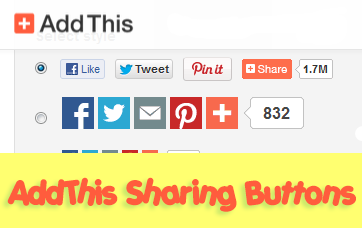
In my opinion, AddThis is the most complete social sharing service allowing to share your posts in more than 270 different social networks. I use the AddThis widget, so if you would like to see a live demo, please scroll down to the bottom of this post to see the AddThis sharing buttons.


This tutorial will show you how to register and add this feature on your blog and you will get to know some of the customization options of these buttons. So let's get started!

Getting the AddThis share buttons code

Step 1. Visit the https://www.addthis.com/get/sharing page.
Step 2. To get the sharing buttons and to access the AddThis sharing stats to find out how many people shared your post by using the AddThis feature, click on the "Create account" button.

create addthis account

The site will ask you to make a small registration. Fill out the information to register. It's quick, simple and it's free. To finish the registration, click on the Register button.

register addthis

Step 3. After you've been logged in, right below the "Get sharing buttons for", choose the "A website" option.

addthis share buttons

Step 4. In the "Select style" section, choose the buttons style that you think would look the best on your site/blog. Please note that on the right side you can see a preview of these buttons.

addthis sharing buttons

Step 5. After you have chosen the style, the site will provide a code - click on the "Grab it" button to copy it.

addthis code

The code provided will look like this:
<!-- AddThis Button BEGIN -->
<div class="addthis_toolbox addthis_default_style ">
<a class="addthis_button_facebook_like" fb:like:layout="button_count"></a>
<a class="addthis_button_tweet"></a>
<a class="addthis_button_pinterest_pinit" pi:pinit:layout="horizontal"></a>
<a class="addthis_counter addthis_pill_style"></a>
</div>
<script type="text/javascript">var addthis_config = {"data_track_addressbar":true};</script>
<script type="text/javascript" src="//s7.addthis.com/js/300/addthis_widget.js#pubid=ra-XXXXXXXXXXX"></script>
<!-- AddThis Button END -->
Now that you have selected and set up your AddThis sharing buttons, let's add them in the footer of the posts.

Adding the AddThis sharing buttons on Blogger

Step 1. Access your Blogger Dashboard and go to Template, then click on the Edit HTML button on the right:

blogger template

Step 2. Click anywhere inside the code area and press the CTRL + F keys to open the search box.

Step 3. Type the following line inside the search box and try to find the second occurrence of it - hit Enter:
<div class='post-footer'>
Step 4. Just above this line, add the code for the AddThis social sharing buttons.

Note: If you want to add at the beginning of your posts, add the code below the second:
<div class='post-header'>

How to add more AddThis buttons

To add more buttons, simply choose the button for that social network and add the code just before the </div> tag (refer to the step 5 from above).

Some examples:
<a class="addthis_button_linkedin"></a> /* linkedin button */
<a class="addthis_button_google_plusone" g:plusone:size="medium"></a> /*gplus button */
<a class="addthis_button_digg"></a> /* digg button */
<a class="addthis_button_stumbleupon"></a> /* stumbleupon button */
<a class="addthis_button_print"></a> /* print button */

CSS3 AddThis Share Buttons

You can add just a single button, so that when the reader hovers over it, a menu will open with the options of social networks to share the post.

css3 share buttons, addthis

Visit this page for a demo.

Step 1. Go to Template > click on the Edit HTML button > press the CTRL + F keys and search:
<div class='post-footer'>
Just above this line, paste the following code:
<style type='text/css'>
.addthis_share_btn a, .addthis_share_btn a:visited {
background: #FF5C00; /* background color of the button */
display: inline-block;
padding: 6px 12px;
font-family: arial,helvetica,lucida,verdana,sans-serif;
font-size: 12px;
line-height: 1em;
color: #fff;
text-decoration: none;
-moz-border-radius: 5px;
-webkit-border-radius: 5px;
-moz-box-shadow: 0 1px 3px rgba(0,0,0,0.5);
-webkit-box-shadow: 0 1px 3px rgba(0,0,0,0.5);
border-radius: 5px;
box-shadow: 0 1px 3px rgba(0,0,0,0.5);
text-shadow: 0 -1px 1px rgba(0,0,0,0.25);
border-bottom: 1px solid rgba(0,0,0,0.25);
position: relative;
cursor: pointer;
}
.addthis_share_btn a:hover {
background: #D45500; /* background color on mouse hover */
color: #fff;
}
.addthis_share_btn a:active { top: 1px; }

.addthis_share_btn a span, .addthis_share_btn:visited a span {
background: url(http://www.addthis.com/cms-content/images/gallery/icon-addthis.gif) no-repeat left;
padding: 1px 0 1px 18px;
}
</style>
<!-- AddThis Share Button -->
<div class='addthis_toolbox addthis_share_btn'>
<a class='addthis_button_compact' href='http://addthis.com/bookmark.php'>
<span>Share</span></a>
</div>
<script src='http://s7.addthis.com/js/250/addthis_widget.js' type='text/javascript'/>
<!-- End AddThis Share Button -->

Customization

- To change the color of the button according to the colors of your template, modify the color value in red.
- If you want to change the "Share" text, replace the text in blue.

Step 2. Save the changes by clicking on the Save template button and you're done!

24 Şubat 2014 Pazartesi

Blog Hocam 3 Yaşında!

22 Şubat 2011’tarihinde Blog Hocam’a Hoşgeldiniz! başlığıyla yayınladığım yazıyla başlamıştı BH’nin yayın hayatı. İçimdeki yazma isteğine karşı koyamayıp sırf kendimi tatmin etmek, bunu yaparken de insanlara yardımcı olabilmek amacıyla domain bile almadan oluşturduğum bu blogun 3 sene boyunca güncel kalacağını düşünmemiştim açıkçası.

Blog Hocam 3 yaşında


Sizi istatistiklerle ve rakamlarla meşgul etmek istemiyorum. Yan taraftaki widgetlar ve sayaçlar ne durumda olduğumuzu gayet iyi açıklıyor zaten. 3. yıl dönümü yazımda bugüne kadar başarılı bir şekilde yayında kalmamı sağlayan kişiler teşekkür etmek istedim.

Sadık Okuyucularıma…

Blog Hocam’ı her platormda takip eden, tüm yazılarımı okuyan, değerli yorumlar yazan, bana her şekilde destek olmaya çalışan az ama öz bir okuyucu kitlesi var. Bu kitle bazen artıyor, bazen azalıyor ama kaç kişi olursanız olun sizi seviyorum ve size minnettarım. Blog Hocam’ın 3 yıl boyunca güncel kalmasına sizin verdiğiniz motivasyon 1 numaralı etken.

Sessiz Takipçilerime…

Sessiz sedasız tüm yazılarımı takip eden, belkide bugüne adar hiç yorum yazmamış veya mesaj göndermemiş sessiz bir çoğunluk var. Kimliklerini saklama isteklerine veya benimle muhattap olmak istememelerine saygı duyuyorum elbette. Varlığınızın farkındayım ve sizi de bu şekilde seviyorum :)

Misafir Yazarlara…

Blog Hocam’ın ilk günlerinden itibaren Türkiye’de neredeyse hiç bilinmeyen “konuk yazarlık” ile ilgili makaleler paylaşarak sistemi yaygınlaştırmaya çalıştım. Açıkçası konuk yazarlığın bu kadar çok yaygınlaşacağını hiç tahmin etmemiştim.  3 yıl boyunca Blog Hocam’a yazı göndren, yazısı yayınlanan, yayınlanmayan tüm blog yazarlarına teşekkür ediyorum. Sayenizde cuma günleri okuyucular farklı tatlarda yazılar sunabiliyorum.  

Sponsorlarıma…

3 yıl boyunca sayısını hatırlayamayacağım kadar sponsorluk ve reklam teklifi geldi Blog Hocam’a. Bunların belki büyük bir kısmını geri çevirmek zorunda kaldım ama yine de ilgilendikleri için hepsine teşekkür ederim. Tüm sponsorlar ve reklamverenler sayesinde epey kazanç elde ettim. Onlarca okuyucuma ufak tefek hediyeler verdim.

Google’a…

Üye olduğum topluluklarda ve gelen mesajlarda Google ile ilgili o kadar şikayet okuyorum ki, bugüne kadar hiç sorun yaşamadığım için bir teşekkür de Google’a etmek istedim :) Yazılarım anında indeksleniyor, aramalardan gelen ziyaretçi sayısı her geçen gün artıyor, AdSense’e hiç başvuru yapmadan kendileri bana yayıncı olmamı teklif etti vs. Teşekkürler Google’!

Nice Senelere…

3 yıldır yazılarımı amatör bir ruhla, samimi bir şekilde yazmaya çalıştım fakat bloga yaklaşımım hep profesyonelce oldu.  Bundan sonra aynı tutum içerisinde olmaya devam edeceğim. Umarım 4. yılında da Blog Hocam’ı aynı güncellikte ve kalitede tutmayı başarablirim. (Her ne kadar imkansız gibi gözüksede… )

Sağlıcakla kalın, Blog Hocam’ı okumaya devam edin…


Not: Blog Hocam’ın 3 yılını doldurması şerefine aktif e-posta abonelerinden 10 kişinin blogunu 1 ay süreyle ücretsiz olarak yayınlayacağımı daha önce duyurmuştum. Söz verdiğim gibi çekilişi yaptım ve 10 kişiye durumu anlatan e-posta gönderdim. İçlerinde cevap vermeyenler olduğu için bugğne yetiştiremedim fakat yedeklerle iletişime geçip 10 kişiyi tamamlayınca linkler 1 ay süreyle BH’de dönmeye başlayacak.

23 Şubat 2014 Pazar

CSS3 Transition Property Basics

You can see on various blogs an interesting effect on some links. Most of the time, when you hover over a link, something changes in its style: it will either change its color or background or will become underlined. What about this cool effect that consists in gradual transition from one style to another, as you can see in this demo below:
Hover Over Me!

This transition is achieved by using the CSS3 transition property - property which is supported in all major browsers like Chrome, Firefox, Opera, Safari (for Safari we will need the -webkit- prefix to get this effect).

The CSS3 Transition Syntax

The syntax of the transition supports four values:
- the property affected by the transition, such as color, border, background, width, etc.
- the duration of this transition in seconds, i.e., how long it will take to change your style completely
- the delay time for the transition to be executed, also in seconds, i.e., how long it takes for the transition to start when the mouse hovers over that element;

Check out the code below:
.example {
 transition-property: width; /* property that undergoes a transition */
 transition-duration: 2s; /* duration of the transition */
 transition-timing-function: linear; /* timing-function */
 transition-delay: 0; /* length of time to delay the start of a transition */
/* now we will repeat the entire declaration with the -webkit- prefix for the effect to work in Chrome and Safari */
 -webkit-transition-property: width;
 -webkit-transition-duration: 2s;
 -webkit-transition-timing-function: linear;
 -webkit-transition-delay: 0;
}
In the example above, the elements with the class .example will become wide within two seconds as the mouse passes over them.

When we define the style of a link, usually we need to use the a:link selector, and when defining the style when the mouse is over the link, we need to use the :hover selector. However, the transition can be used in any HTML element, not just links. To make the transition effect to work properly, we should define two blocks of style for that element, i.e. the normal style for a tag/id/class and the style on mouse :hover for a specific tag/id/class.

For example:
tag, #id, .class {
/* insert here the styles that you want for the selector */
/* insert below the transition effects */

}
tag:hover, #id:hover, class:hover {
/* Insert here the styles for when the mouse is over the element */
/* here it is not necessary to repeat the declaration of the transition */

}
You can add the same style on multiple selectors separated by commas as I have done above, although that's not necessary.

Below are some transition examples with their respective codes.

I will not use the transition-timing-function in these examples because it makes no difference, as the first value is the duration in seconds and the second is the delay.

Example 1

Transition example

/* with a single property */
#example1 {
 background-color: #FFFF00;
-moz-transition-property: background-color;
-moz-transition-duration: 2s;
-webkit-transition-property: background-color;
-webkit-transition-duration: 2s;
-o-transition-property: background-color;
-o-transition-duration: 2s;
}
#example1:hover {
background-color: #B5E2FF;
}

Example 2

Transition example

/* with four properties and delay */
#example2 {
background-color: #9c3;
border: 8px solid #690;
padding: 20px;
color: #fff;
-moz-transition-property: background-color,border;
-moz-transition-duration: 1s;
-webkit-transition-property: background-color,border;
-webkit-transition-duration: 1s;
-o-transition-property: background-color,border;
-o-transition-duration: 1s;
}
#example2:hover {
background-color: #690;
border: 8px dashed #fff;
color: #FFFF00;
-moz-transition-property: background-color,border;
-moz-transition-duration: 2s;
-webkit-transition-property: background-color,border;
-webkit-transition-duration: 2s;
-o-transition-property: background-color,border;
-o-transition-duration: 2s;
}
Example 3

Transition example

/* with seven properties and delay */
#example3 {
padding: 15px;
background-color: #FF7CA6;
font-size: 16px;
width: 30%;
font-weight: bold;
color: #fff;
height: 20px;
-moz-transition-property: background-color,width,height,padding,font-size,color;
-moz-transition-duration: 1s;
-webkit-transition-property: background-color,width,height,padding,font-size,color;
-webkit-transition-duration: 1s;
-o-transition-property: background-color,width,height,padding,font-size,color;
-o-transition-duration: 1s;
}
#example3:hover {
background-color:#9c3;
width: 60%;
height: 60px;
padding: 50px;
font-size: 30px;
color: #FFFF00;
-moz-transition-property: background-color,width,height,padding,font-size,color;
-moz-transition-duration: 2s;
-webkit-transition-property: background-color,width,height,padding,font-size,color;
-webkit-transition-duration: 2s;
-o-transition-property: background-color,width,height,padding,font-size,color;
-o-transition-duration: 2s;
}
Example 4

Transition example

/* with all the properties simultaneously */
#example4 {
padding: 15px;
background-color: #9c3;
color: #fff;
font-size: 16px;
width: 30%;
font-weight: bold;
transition: all 2s;
-webkit-transition: all 2s;
}
#example4:hover {
background-color: #FF7CA6;
color: #242424;
width: 60%;
}
Final words:

- the transition declarations need to appear in the CSS. In Blogger, the CSS is located before ]]</b:skin>
- as you can see in the examples above, you can assign different rules for the transitions of different elements in a single rule - just separate them with commas.
- it is not mandatory to use the four properties in the transition declaration, but their order must always look like this: property/duration/timing-function/delay.
- the duration and delay values ​​must be expressed in seconds, but sometimes a second is a long time for a transition. In this case you can use values with milliseconds, for example, .5s means half a second.
- In small time intervals, the timing of the transition-function property does not give a remarkable effect being most useful only in more advanced animations. The possible values are either ease (the default, which makes the transition with a slow beginning, then gets faster and ends slowly), linear (the same transition speed from beginning to end), ease-in (transition begins slowly and then the speed increases), ease-out (transition starts fast and slows down at the end) and ease-in-out.